



Konuyu Açan
#1
RaxBoard 1.9.8 — security release
Version 1.9.8 · build 20261021 · security release
Every board should update. The post editor could run script hidden in a post's BB code when that post was opened in the editor; 1.9.8 closes this. Update now as well if your board uses:
- route filters with aliases (Admin → Route Filters): an alias could get around pages that require signing in and the login attempt limit;
- hidden-content tags: hidden text could leak in some posts (the update also cleans the search index);
- two-factor sign-in: an authenticator code or a backup code could be used more than once;
- license protection (sealed installations): the integrity check is stricter, so a damaged or incomplete installation is reported clearly instead of being accepted silently.
Before you start: the update to 1.9.8 is run by the 1.9.7 in-app updater, which can delete files you added under
src/, templates/, public/assets/ or migrations/. If you have such files, copy them to a safe place first and put them back after the update. Updates from 1.9.8 on keep them.Compatibility: the theme updates of this release still require core 1.9.7 or newer, and the add-on updates core 1.9.1 or newer (Special Days Pro runs on any core version, as before). Some of their fixes take effect only on core 1.9.8, and Migrate imports XenForo warning definitions only on core 1.9.8.
Today, together with 1.9.8, come six add-on updates, new versions of the themes listed below, and a second update of the language packs. Resource Hub 1.2.4, the Wavy and Kalium updates and the first language-pack update came out earlier this week: see Released with 1.9.8 today and Released earlier this week below. The core details (every security fix, new features, fixes, and what to check before and after upgrading) are in the first two replies below.
A closer look at 1.9.8
Twelve highlights, the first ten with a picture. The first two replies below list every core change.
1. Route filters: aliases pass the same checks, and the form says what a filter does
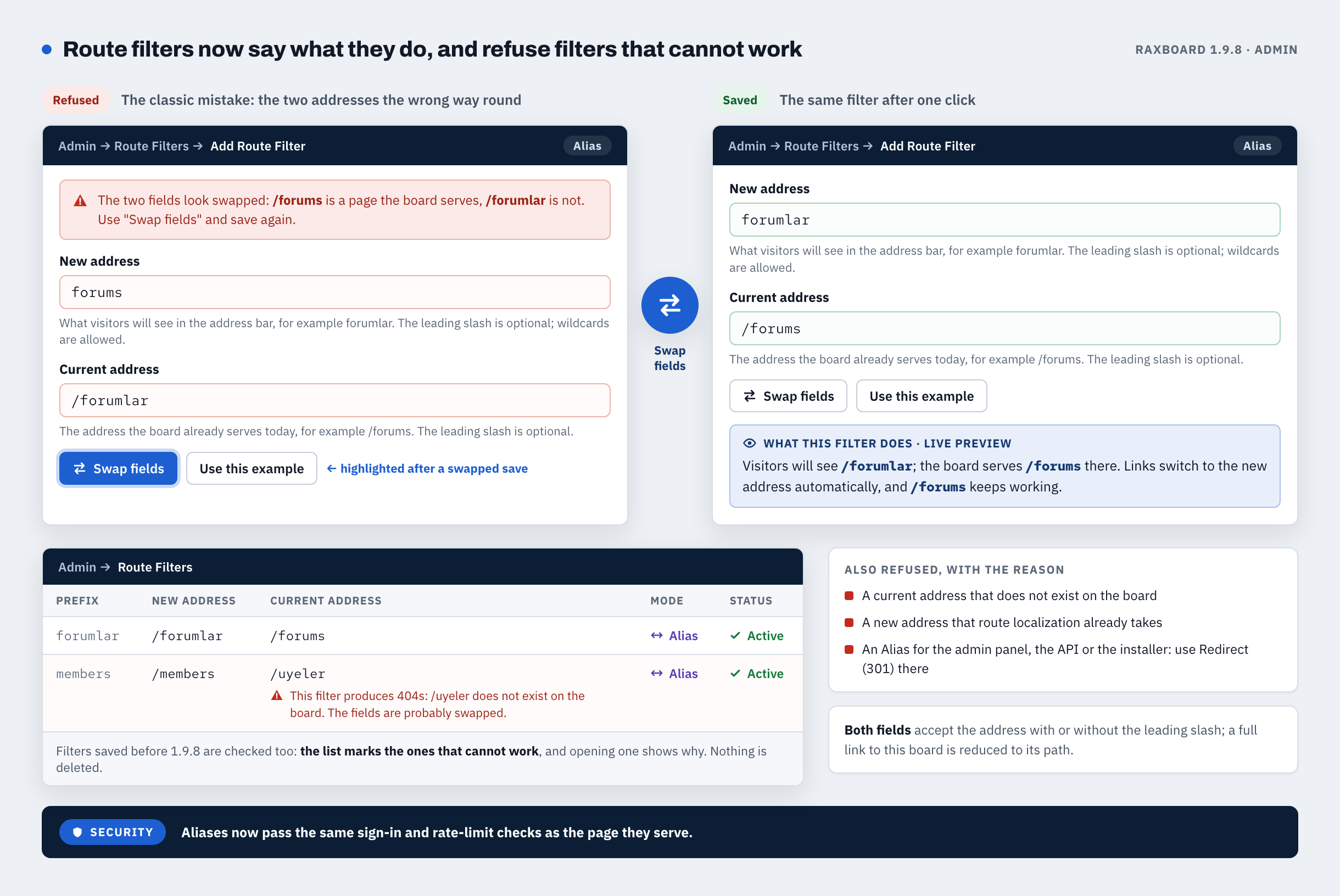
Security: a route filter alias now passes the same sign-in and rate-limit checks as the page it serves.
- The form under Admin → Route Filters names its fields plainly: New address (what visitors see) and Current address (the page the board already serves), with a live preview, an example and a Swap fields button.
- A filter that would produce "page not found" errors is refused with the reason. When the two addresses are the wrong way round, Swap fields is highlighted.
- The list marks filters saved earlier that cannot work, and opening one shows why. Nothing is deleted.
2. Editor: everything it shows passes one allow-list
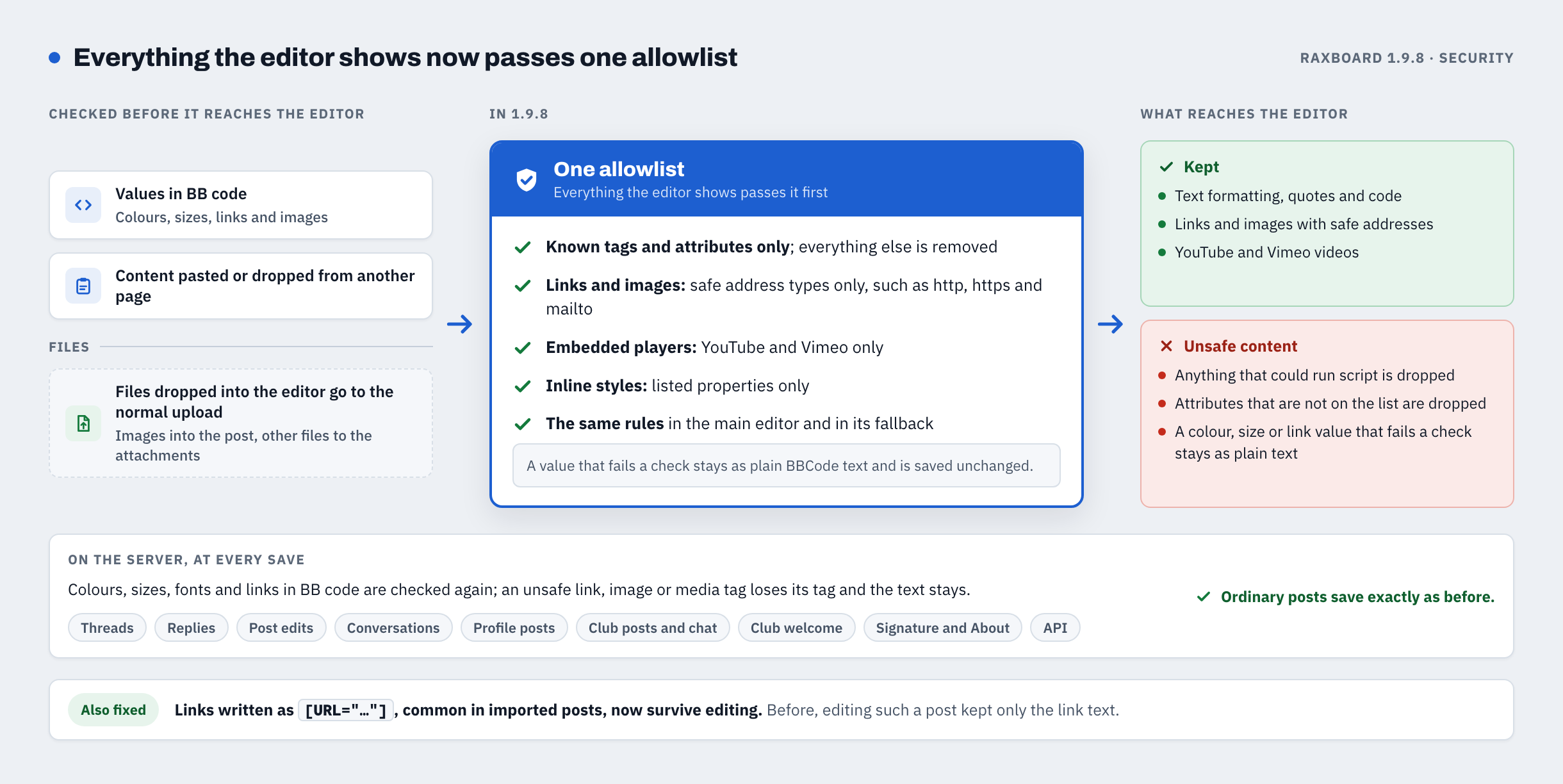
Security, every board: a crafted post could run script in the browser of whoever opened it in the editor. In 1.9.8 everything the editor shows passes one allow-list cleaner.
- This covers what you type, toolbar buttons and smilies, pasted or dropped content, quotes, link preview cards and saved posts opened for editing. The fallback editor uses the same rules.
- A value that fails a check stays as plain BB code text and is saved back unchanged, and the server checks again on save.
- Ordinary posts save exactly as before.
3. Member pages are much lighter right after an update
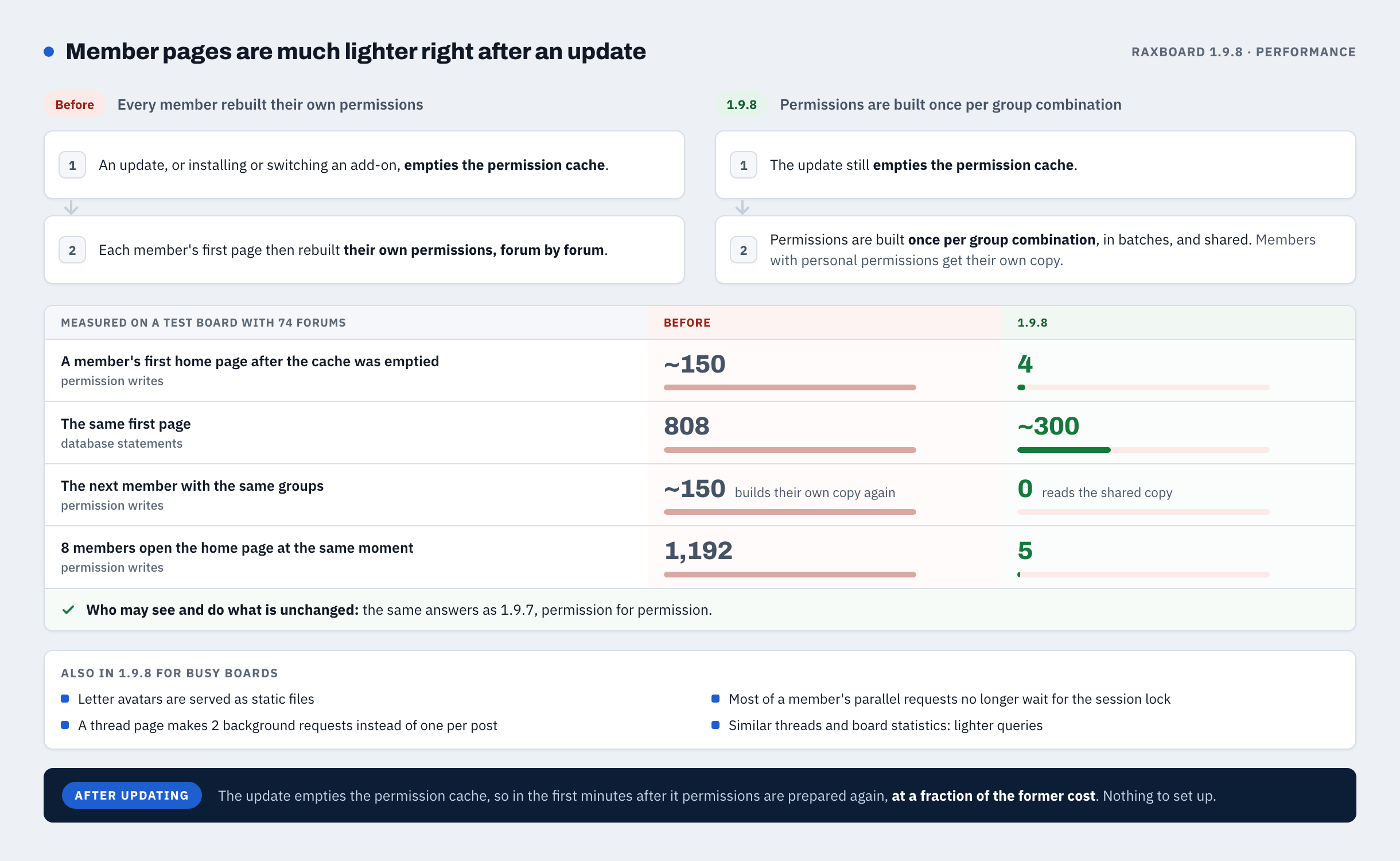
An update, or installing or switching an add-on, empties the permission cache. 1.9.8 then builds permissions once per group combination and shares them, instead of rebuilding them member by member and forum by forum.
- On a test board with 74 forums, 8 members opening the home page at the same moment made 1,192 permission writes on 1.9.7 and 5 on 1.9.8.
- One member's first home page after the cache was emptied ran 808 database statements on 1.9.7 and about 300 on 1.9.8.
- Who may see and do what is unchanged. Nothing to set up.
4. A half-finished update no longer keeps the board in maintenance mode
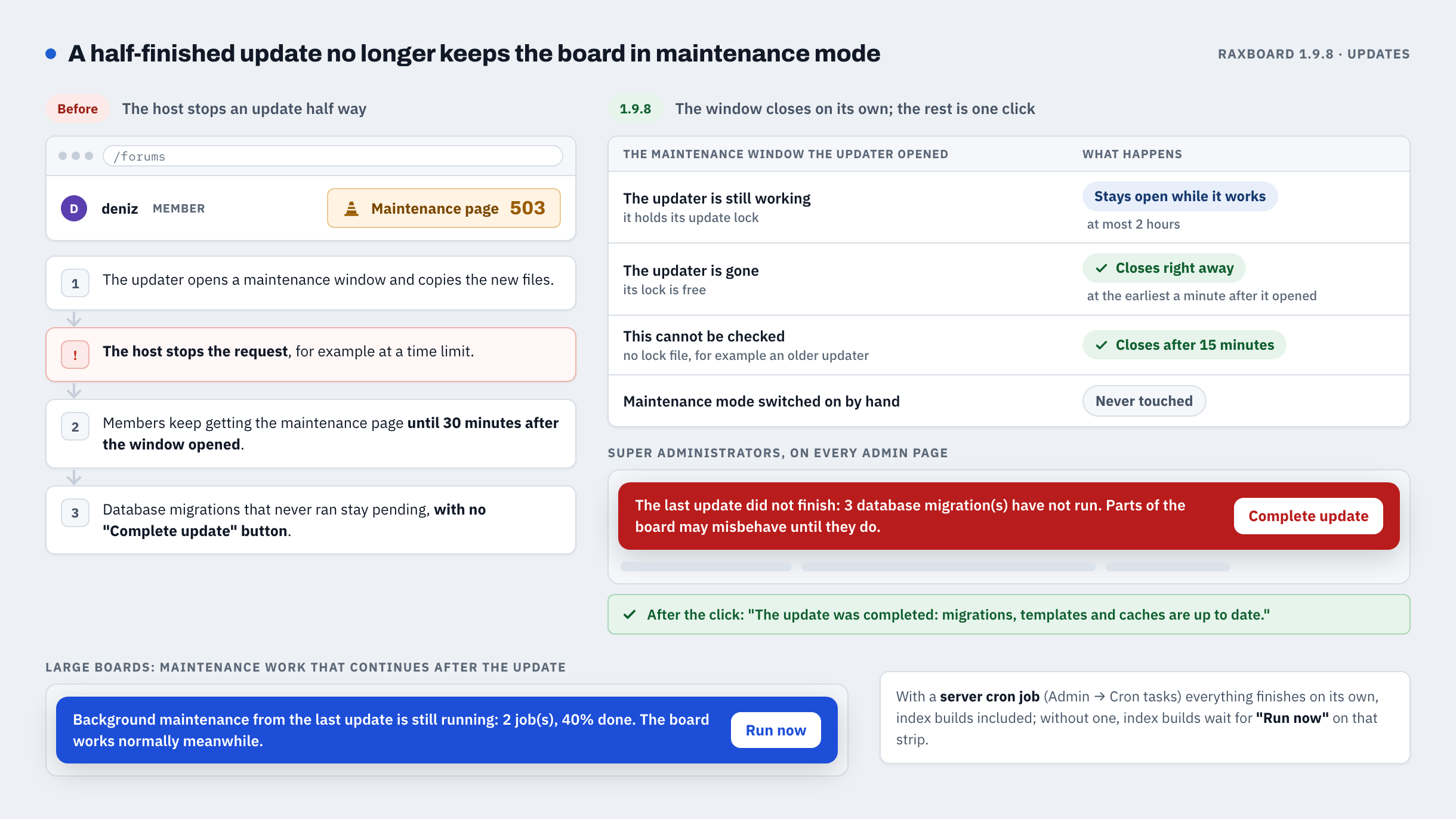
If the host stops an update half way, members no longer stay on the maintenance page for 30 minutes after the maintenance window opened.
- Once the updater is gone, the window it opened closes right away (never in its first minute); when this cannot be checked, after 15 minutes. Maintenance mode switched on by hand is never touched.
- When an update left database migrations unrun, super administrators see The last update did not finish with a Complete update button on every admin page.
- Heavy database work can finish in the background after an update, shown in a strip with a Run now button.
5. Fresh installs: the first administrator gets user ID 1
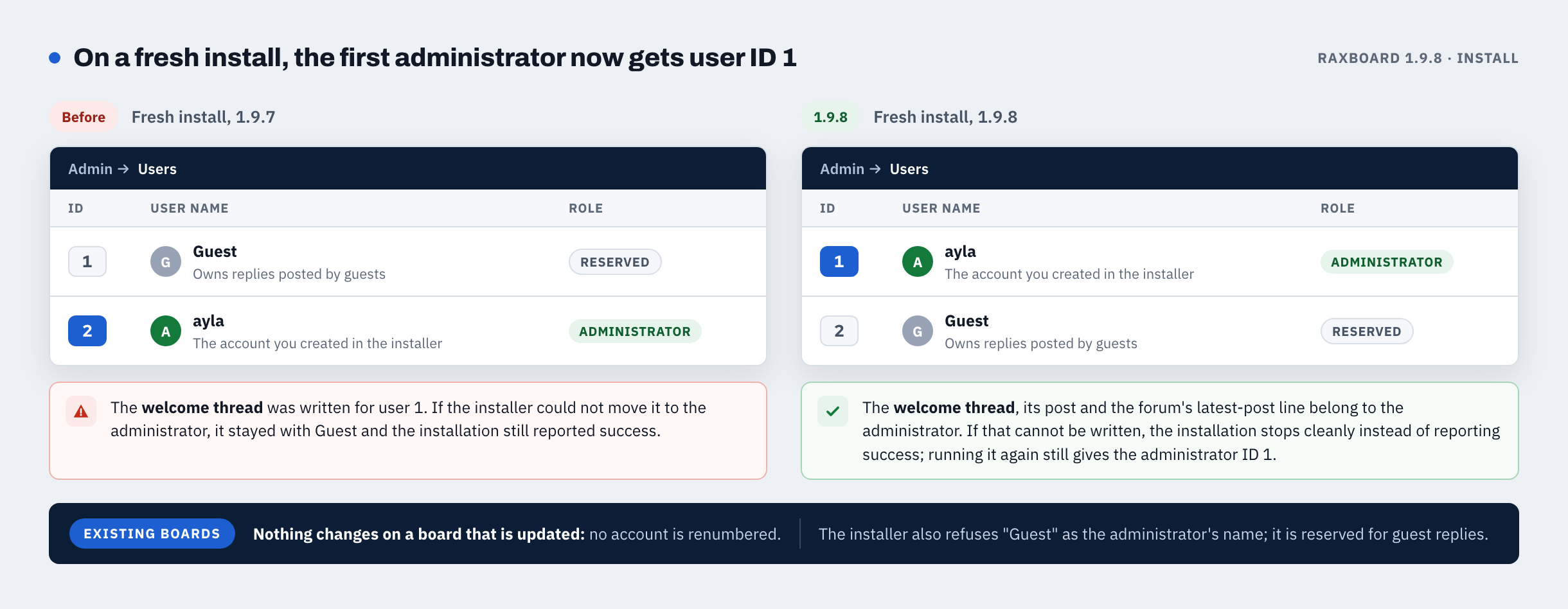
Only new installations change. On a board that is updated, no account is renumbered.
- The administrator account gets ID 1 and the guest-author account, which owns replies posted by guests, ID 2. The welcome thread belongs to the administrator.
- The installer refuses "Guest" as the administrator name.
- If the last step fails, the installation stops cleanly instead of reporting success, and running it again still gives the administrator ID 1.
6. Warnings: edit issued warnings, keep ready-made ones
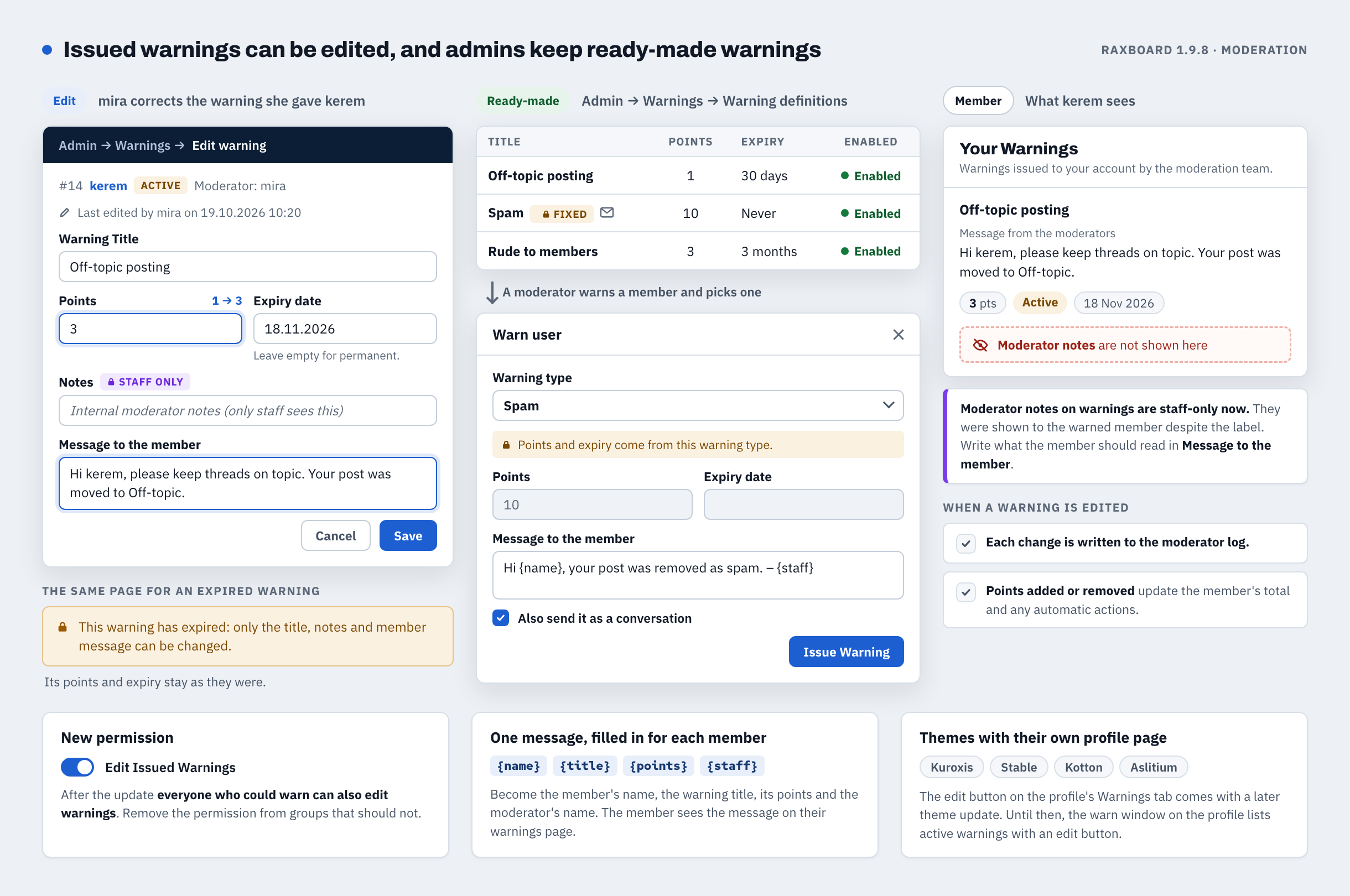
- Staff with the new Edit Issued Warnings permission can change a warning's points, expiry, title and message to the member. Every change is written to the moderator log and updates the member's total.
- Ready-made warnings live under Admin → Warnings → Warning definitions; moderators pick one when they warn.
- Privacy: moderator notes on warnings are now visible to staff only. Write what the member should read in Message to the member.
- After the update, everyone who could issue warnings can also edit them. Remove the new permission from groups that should not.
7. Special characters in the editor
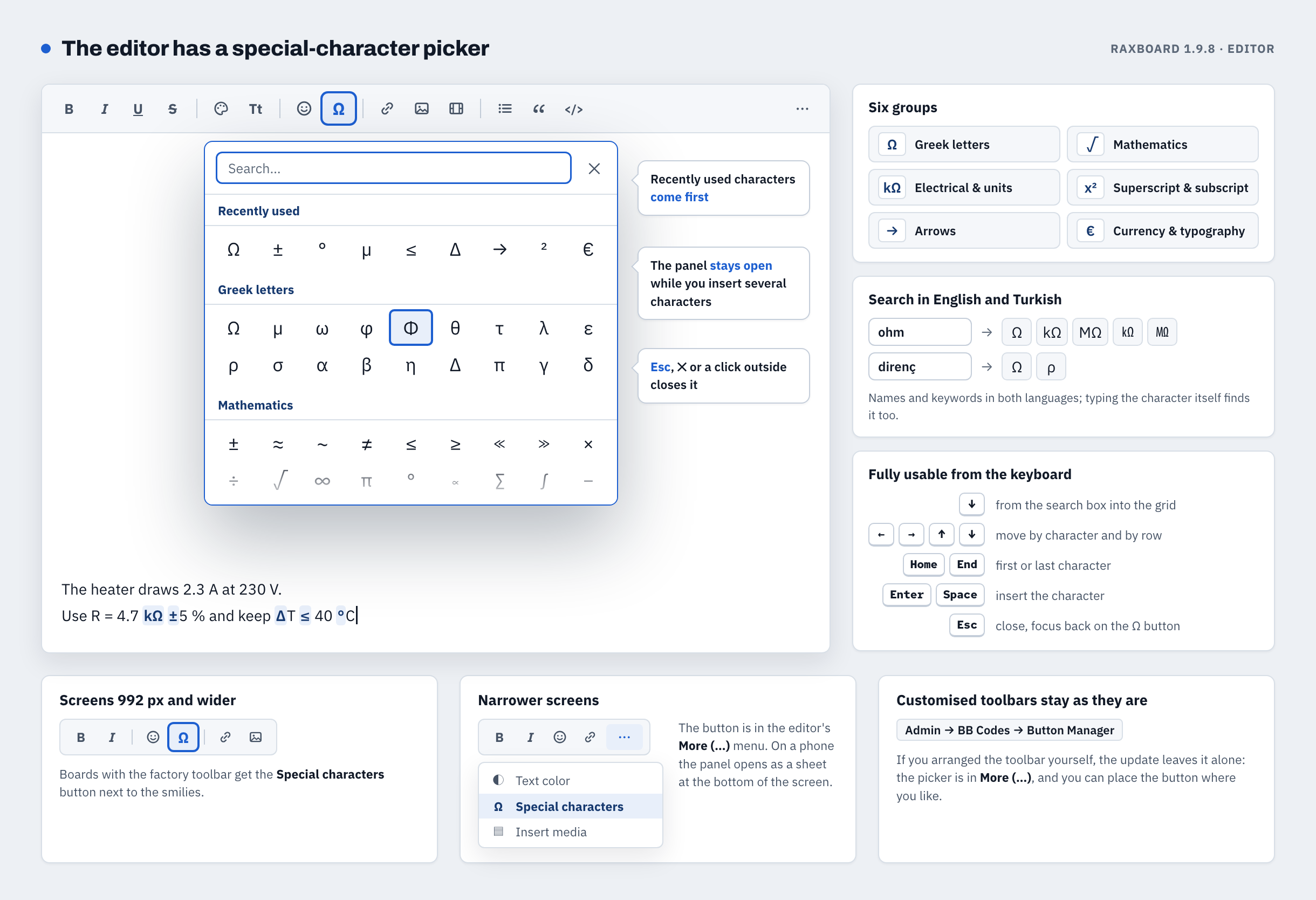
The editor has a Special characters button (Ω) next to the smilies: six groups, search in English and Turkish, recently used characters first, fully usable from the keyboard. With the factory toolbar the button shows on screens 992 px and wider; otherwise it is in the editor's More (…) menu, and it can be placed under Admin → BB Codes → Button Manager.
8. Forum logos follow one rule in every theme
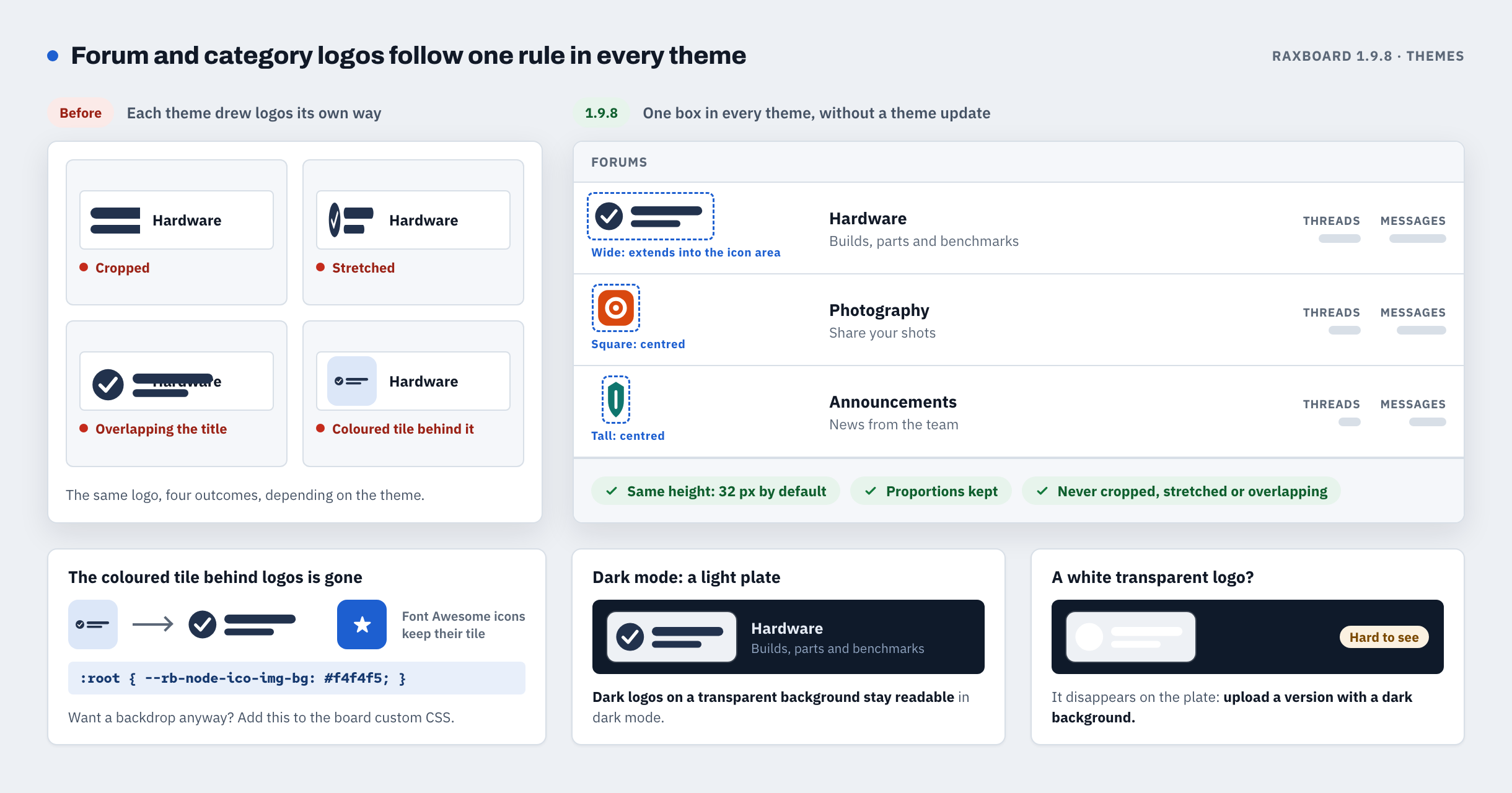
Forum and category logos are drawn the same way in every theme, without a theme update: a box of the same height (32 px by default), proportions kept, so no theme crops, stretches or overlaps a logo any more.
- The coloured tile behind logos is gone (Font Awesome icons keep it). To keep a backdrop, add
:root { --rb-node-ico-img-bg: #f4f4f5; }to the board's custom CSS. - In dark mode logos sit on a light plate. A white logo on a transparent background needs a version with a dark background.
9. Thread prefix designs on phones
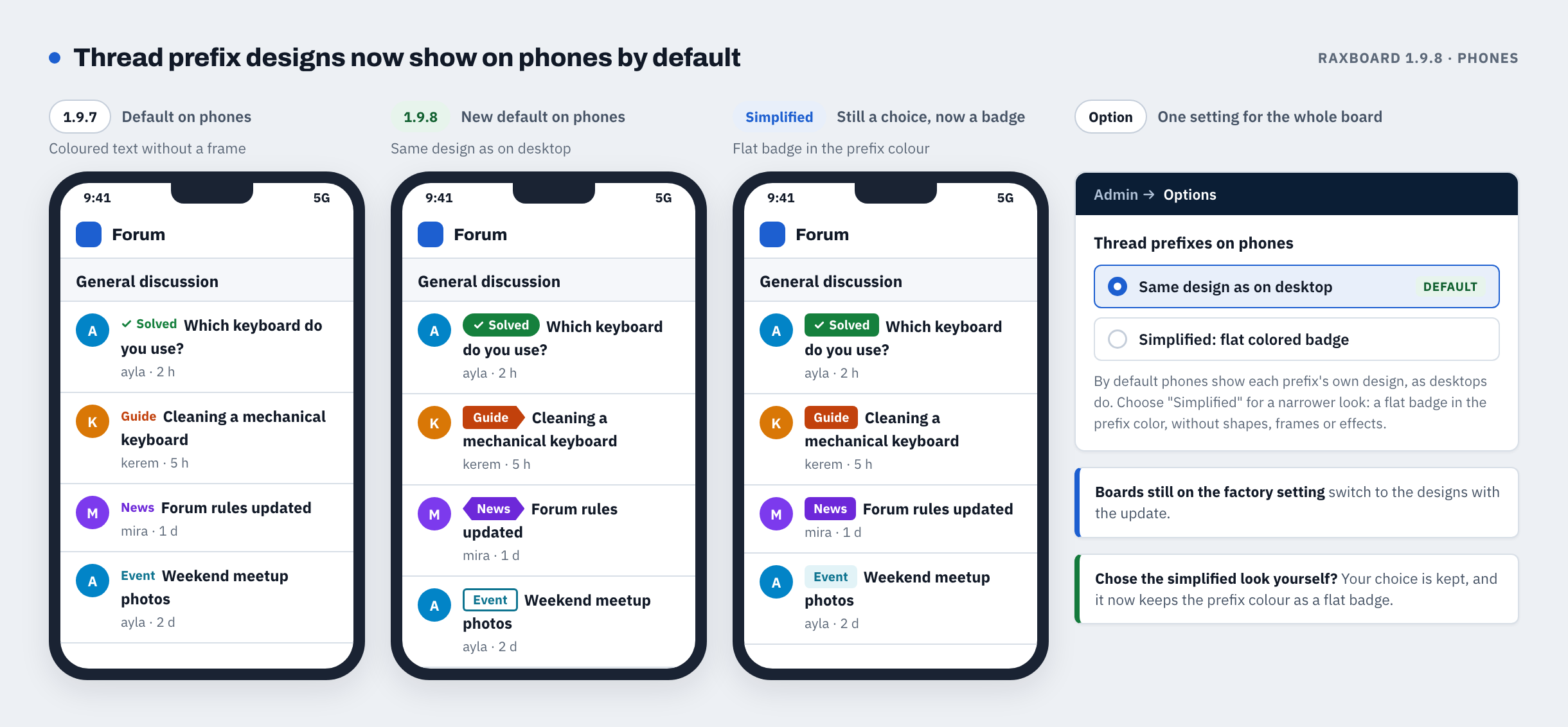
Thread prefix designs now show on phones by default, as on desktops. The simplified look is still available under Options → Content → Thread prefixes on phones and now keeps the prefix colour as a flat badge. Boards where an administrator chose it keep it.
10. The "Top (horizontal)" postbit lines up in every theme
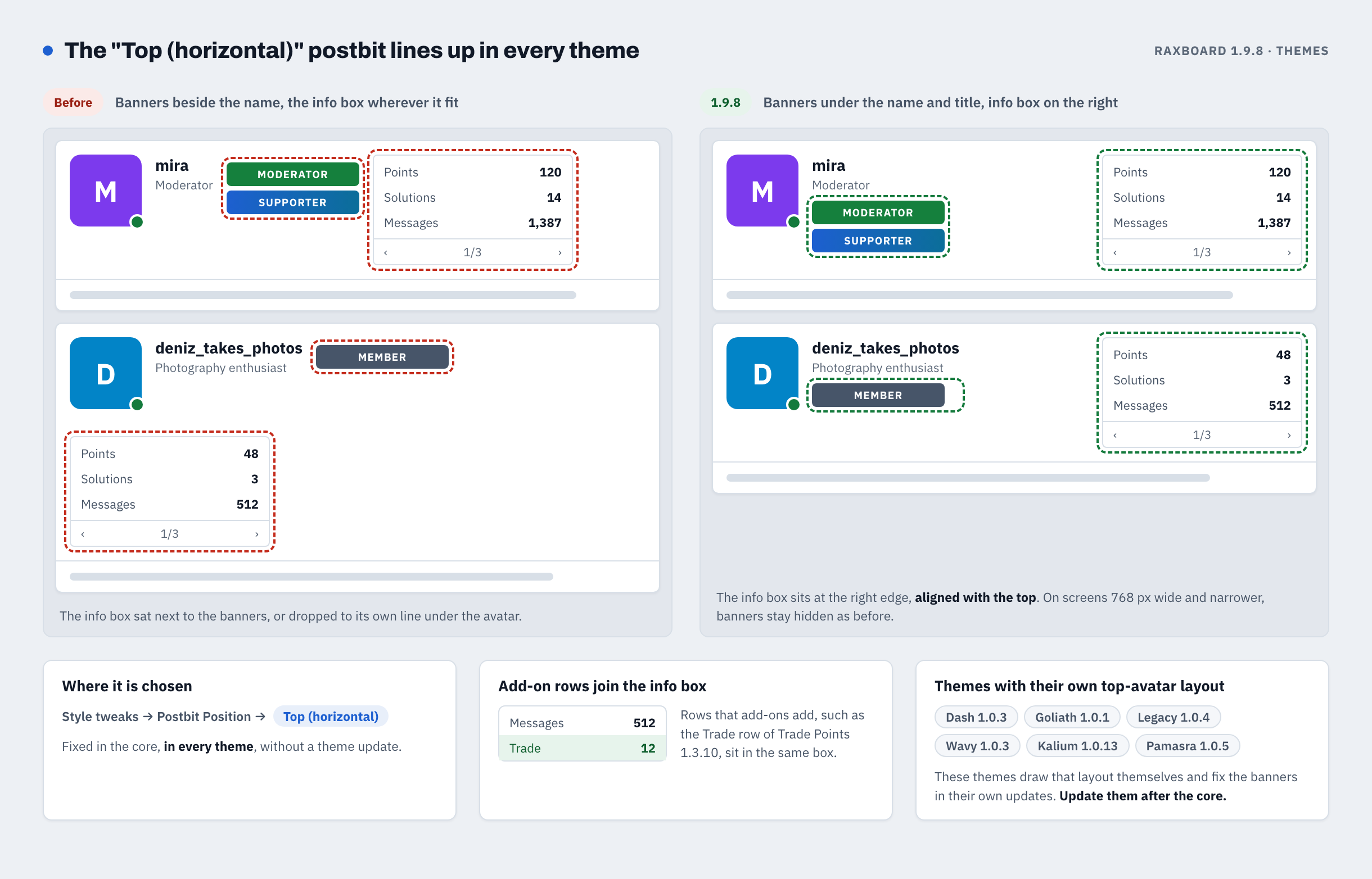
Members choose this layout under Style tweaks → Postbit Position → Top (horizontal). 1.9.8 fixes it in the core, in every theme: group banners sit under the name and title, and the info box sits on the right, aligned with the top. Rows that add-ons add, such as the Trade row of Trade Points (since 1.3.10), join the box.
Dash, Goliath, Legacy, Wavy, Kalium and Pamasra also draw their own top-avatar layout (Theme Customizer → Layout → Post author layout → Top avatar). Their updates released earlier this week (Dash 1.0.3, Goliath 1.0.1, Legacy 1.0.4, Wavy 1.0.3, Kalium 1.0.13, Pamasra 1.0.5) fix the banners there, and every later version of these themes keeps the fix.
11. Trophies and promotions: new criteria, a progress card, Member of the Week and Month
- Trophies and user group promotions can also use threads started, accepted answers, reputation and activity (time on the forum, days active, the longest daily visit streak). A trophy can also require threads, messages or accepted answers in one forum.
- Admin → Trophies → Criteria lists every criterion with the number of rules that use it. A rule whose criterion is not available is held: it promotes, demotes and awards nobody until the criterion is back.
- Members see a progress card at the top of their own profile: the trophy they are closest to, their next automatic title and, for promotions marked Show progress to members, how close they are to the next rank. Nobody else sees the card.
- Member of the Week and Member of the Month: the board can pick its most active members automatically and give them a banner for the next period. Both are off after the update; switch them on under Options → Trophies.
- The user title ladder can also climb by reputation, threads started or accepted answers.
12. A new look for the admin panel
Clearer headings, a top bar with search (Ctrl/⌘+K), framed action buttons and modern form controls, readable in light and dark mode. Pages and menu entries stay where they were, and add-on pages that use the standard admin styles take on the new look by themselves.
Update order
- Back up the database and the files, and copy out files of your own from the core folders (see above).
- Update the core to 1.9.8 with the in-app updater.
- Then update your themes: today's versions are in the list below; if you have not installed Wavy and Kalium from earlier this week yet, install them too. Several of today's theme fixes need core 1.9.8. If your board uses Dash, update it to 1.0.4 together with the core. Updating a theme reinstalls its own templates, so back up template edits first.
- Then re-install your language packs from the marketplace (today's second update), so the new texts are translated.
The add-ons released today, Trade Points 1.3.11, Stories 1.1.4, Media Gallery 1.1.2, Latest Threads 1.3.28, Special Days Pro 1.2.6 and Migrate 1.3.1, and Resource Hub 1.2.4 from earlier this week can be updated before or after the core; some of their fixes show only on core 1.9.8. To import XenForo warning definitions with Migrate, update the core to 1.9.8 first. Two new free add-ons, Credits 1.0.0 and Classifieds 1.0.0, follow in a separate release. Both require core 1.9.7 or newer. Large boards, database servers, custom BB codes kept out of signatures and boards behind a CDN: see Before you upgrade in the first reply and After upgrading in the second reply below.
Released with 1.9.8 today
The RaxBoard replies below describe every product in this list and the next. Each one also has its own thread in the Marketplace Updates forum with its full changelog:
- 6 add-ons, updated: Trade Points 1.3.11 · Stories 1.1.4 · Media Gallery 1.1.2 · Latest Threads 1.3.28 · Special Days Pro 1.2.6 · Migrate 1.3.1
- 9 themes, updated: Kuroxis 1.0.37 · Aslitium 1.0.12 · Stable 1.1.17 · Kotton 1.0.28 · Dash 1.0.4 · Goliath 1.0.2 · Vision 1.0.21 · Legacy 1.0.5 · Pamasra 1.0.6
- 7 language packs, updated a second time: the new texts that were added last. Their versions are in the language packs reply below.
Released earlier this week — update them together with 1.9.8
- 1 add-on: Resource Hub 1.2.4
- 2 themes: Wavy 1.0.3 · Kalium 1.0.13
- 7 language packs, first update: Türkçe 1.0.31 · Azərbaycan 1.0.18 · Español 1.0.20 · Français 1.0.11 · Русский 1.0.11 · Deutsch 1.0.11 · العربية 1.0.11
In the replies below
- Core 1.9.8 in detail (1 of 2): who should upgrade, every security fix, the new features and what to check before upgrading.
- Core 1.9.8 in detail (2 of 2): notes for add-on and theme developers, fixes, and what to check after upgrading.
- Add-ons: the six updated today and Resource Hub from earlier this week.
- Themes: today's updates, and Wavy and Kalium from earlier this week.
- Language packs: this week's update and today's second one.
Questions, or something that does not behave the way these posts say? Reply here.
RaxBoard 1.9.8 — güvenlik sürümü
Sürüm 1.9.8 · derleme 20261021 · güvenlik sürümü
Her pano güncellemeli. Mesaj editörü, bir mesajın BB kodunda gizlenmiş bir betiği, o mesaj editörde açıldığında çalıştırabiliyordu; 1.9.8 bunu kapatıyor. Panonuzda şunlar varsa da hemen güncelleyin:
- takma adlı rota filtreleri (Yönetim → Rota Filtreleri): bir takma ad, giriş gerektiren sayfaları ve giriş deneme sınırını aşmak için kullanılabiliyordu;
- gizli içerik etiketleri: bazı mesajlarda gizli metin sızabiliyordu (güncelleme arama dizinini de temizliyor);
- iki adımlı doğrulama: doğrulama uygulamasının kodu ya da bir yedek kod birden çok kez kullanılabiliyordu;
- lisans koruması (mühürlü kurulumlar): bütünlük denetimi sıkılaştı; hasarlı ya da eksik bir kurulum artık sessizce kabul edilmiyor, açıkça bildiriliyor.
Başlamadan önce: 1.9.8'e güncellemeyi 1.9.7'nin uygulama içi güncelleyicisi yürütür; bu güncelleyici
src/, templates/, public/assets/ ya da migrations/ altına eklediğiniz dosyaları silebilir. Böyle dosyalarınız varsa önce bunları güvenli bir yere kopyalayın, güncellemeden sonra yerlerine koyun. 1.9.8'den sonraki güncellemeler onları korur.Uyumluluk: bu sürümün tema güncellemeleri hâlâ çekirdek 1.9.7 ya da üstünü, eklenti güncellemeleri ise hâlâ çekirdek 1.9.1 ya da üstünü istiyor (Special Days Pro eskisi gibi her çekirdek sürümünde çalışıyor). Bu güncellemelerin bazı düzeltmeleri yalnız çekirdek 1.9.8'de etkili oluyor; Migrate de XenForo'nun hazır uyarılarını yalnız çekirdek 1.9.8'de aktarıyor.
Bugün 1.9.8 ile birlikte altı eklenti güncellemesi, aşağıda listelenen temaların yeni sürümleri, ve dil paketlerinin ikinci güncellemesi çıkıyor. Resource Hub 1.2.4, Wavy ile Kalium güncellemeleri ve dil paketlerinin ilk güncellemesi ise bu hafta çıktı: aşağıdaki 1.9.8 ile bugün yayınlananlar ve Bu hafta yayınlandı bölümlerine bakın. Çekirdeğin ayrıntıları (bütün güvenlik düzeltmeleri, yenilikler, düzeltmeler, güncellemeden önce ve sonra bakılacaklar) aşağıdaki ilk iki yanıtta.
1.9.8'e yakından bakış
On iki öne çıkan değişiklik, ilk onu görselli. Çekirdeğin bütün değişiklikleri aşağıdaki ilk iki yanıtta.
1. Rota filtreleri: takma adlar aynı denetimlerden geçiyor, form filtrenin ne yaptığını söylüyor
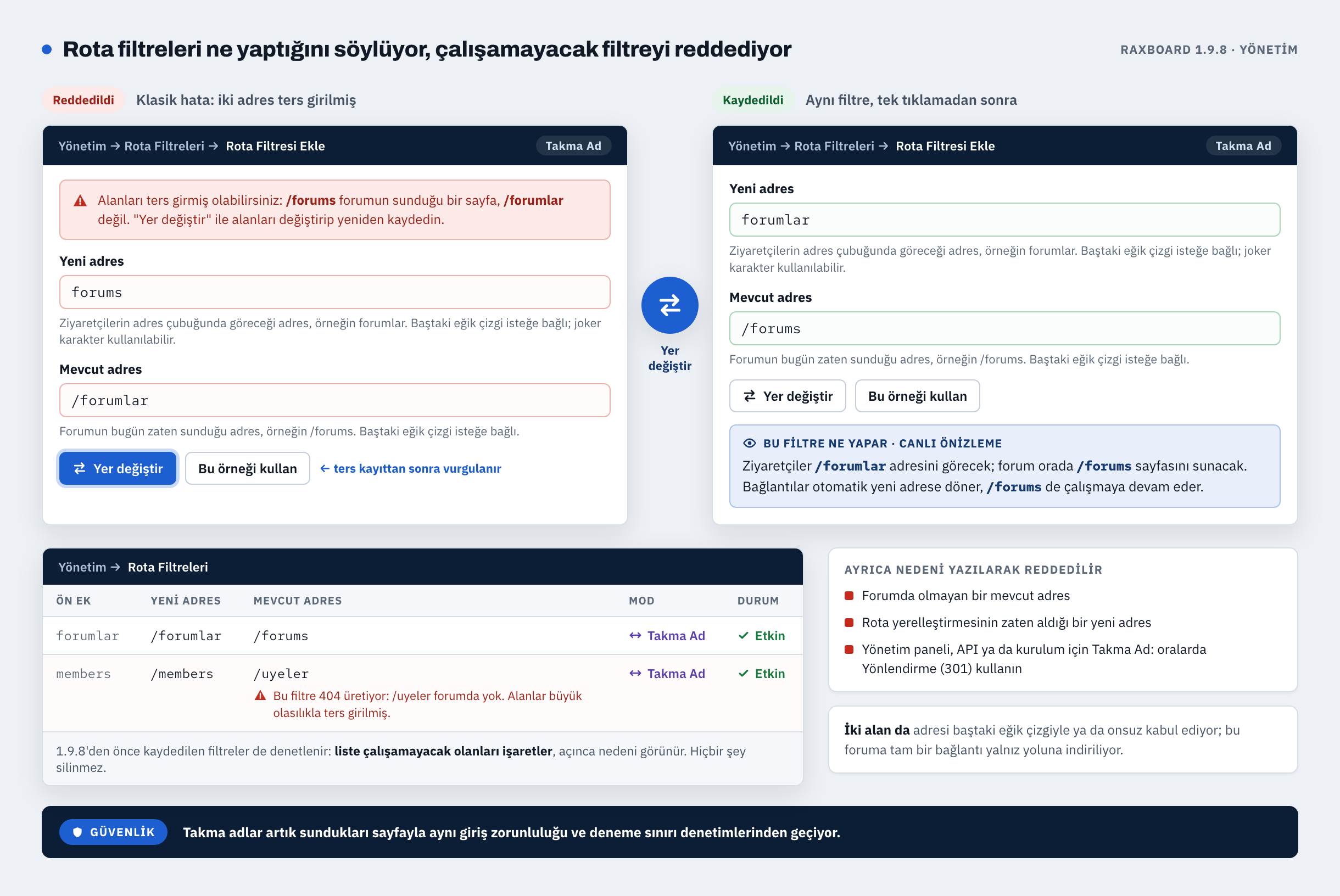
Güvenlik: rota filtresi takma adı artık sunduğu sayfayla aynı giriş zorunluluğu ve deneme sınırı denetimlerinden geçiyor.
- Yönetim → Rota Filtreleri altındaki form, alanlarını açıkça adlandırıyor: Yeni adres (ziyaretçilerin gördüğü) ve Mevcut adres (panonun zaten sunduğu sayfa). Canlı önizleme, bir örnek ve Yer değiştir düğmesi de var.
- "Sayfa bulunamadı" hatası üretecek bir filtre nedeni yazılarak reddediliyor. İki adres ters girilmişse Yer değiştir vurgulanıyor.
- Liste, daha önce kaydedilmiş ve çalışamayacak filtreleri işaretliyor; birini açınca nedeni görünüyor. Hiçbir şey silinmiyor.
2. Editör: gösterdiği her şey tek bir izin listesinden geçiyor
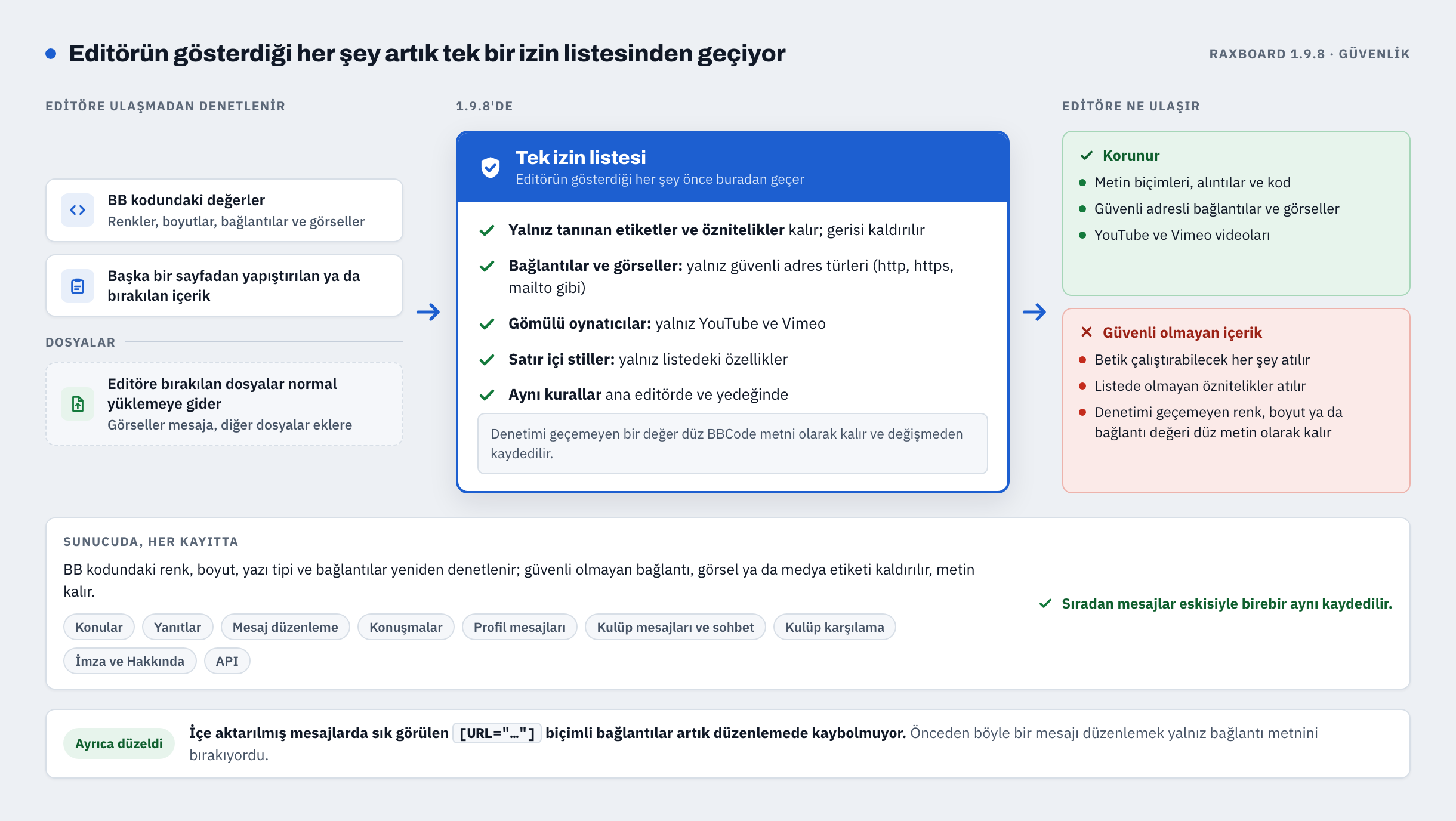
Güvenlik, her pano: özel hazırlanmış bir mesaj, onu editörde açan kişinin tarayıcısında betik çalıştırabiliyordu. 1.9.8'de editörün gösterdiği her şey tek bir izin listesi temizleyicisinden geçiyor.
- Bu; yazdıklarınızı, araç çubuğu düğmelerini ve ifadeleri, yapıştırılan ya da sürüklenen içeriği, alıntıları, bağlantı önizleme kartlarını ve düzenlemek için açılan kayıtlı mesajları kapsıyor. Yedek editör de aynı kuralları kullanıyor.
- Denetimden geçmeyen değer düz BB kodu metni olarak kalıyor ve değişmeden geri kaydediliyor; sunucu da kayıtta yeniden denetliyor.
- Olağan mesajlar tam önceki gibi kaydediliyor.
3. Güncellemeden hemen sonra üye sayfaları çok daha hafif
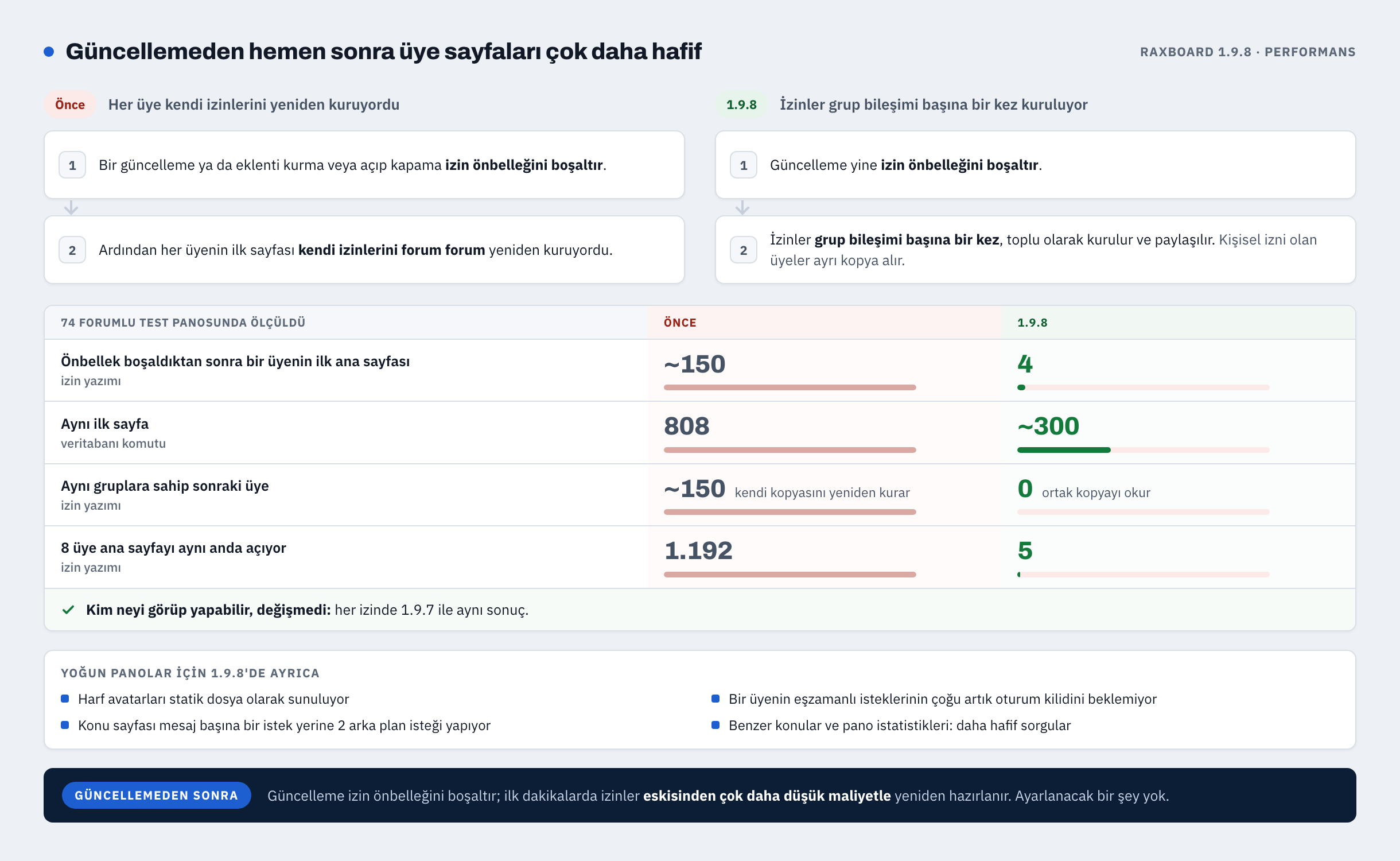
Bir güncelleme ya da bir eklentiyi kurmak veya açıp kapatmak izin önbelleğini boşaltıyor. 1.9.8 bundan sonra izinleri üye üye, forum forum yeniden kurmak yerine grup bileşimi başına bir kez oluşturuyor ve paylaşıyor.
- 74 forumlu bir test panosunda ana sayfayı aynı anda açan 8 üye, 1.9.7'de 1.192, 1.9.8'de 5 izin yazma işlemine yol açtı.
- Önbellek boşaldıktan sonra bir üyenin ilk ana sayfası 1.9.7'de 808, 1.9.8'de yaklaşık 300 veritabanı komutu çalıştırdı.
- Kimin neyi görüp yapabileceği değişmedi. Ayarlanacak bir şey yok.
4. Yarıda kalan güncelleme artık panoyu bakım modunda bırakmıyor
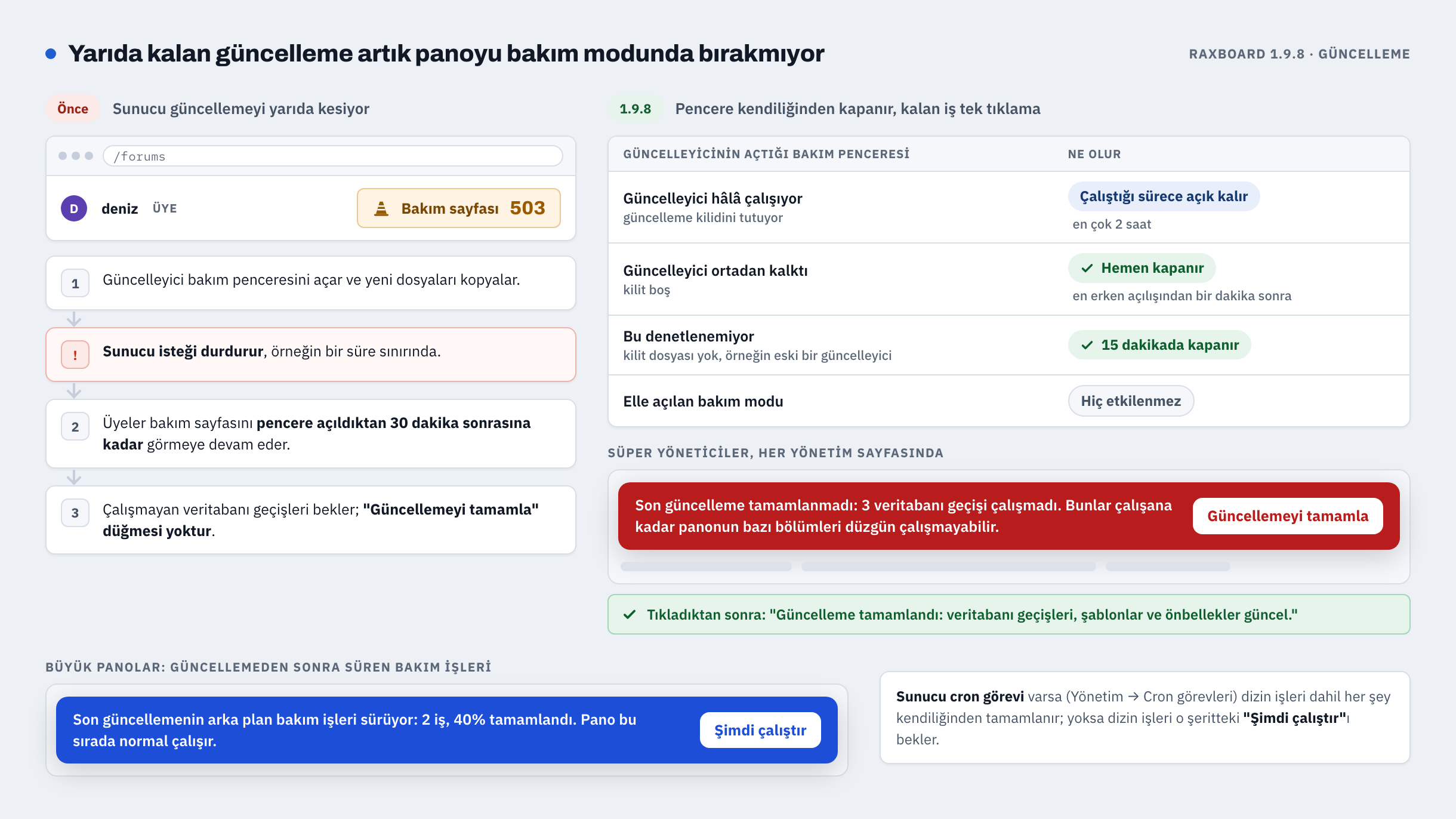
Sunucu bir güncellemeyi yarıda keserse üyeler artık bakım penceresi açıldıktan sonraki 30 dakika boyunca bakım sayfasında kalmıyor.
- Güncelleyici ortadan kalkınca açtığı pencere hemen kapanıyor (açılışından sonraki ilk dakika hariç); bu denetlenemiyorsa 15 dakika sonra kapanıyor. Elle açılan bakım moduna hiç dokunulmuyor.
- Bir güncelleme çalışmamış veritabanı geçişi bıraktıysa süper yöneticiler her yönetim sayfasında Son güncelleme tamamlanmadı uyarısını ve Güncellemeyi tamamla düğmesini görüyor.
- Ağır veritabanı işleri güncellemeden sonra arka planda tamamlanabiliyor; bir şerit ilerlemeyi ve Şimdi çalıştır düğmesini gösteriyor.
5. Yeni kurulumlar: ilk yönetici 1 numaralı kullanıcı
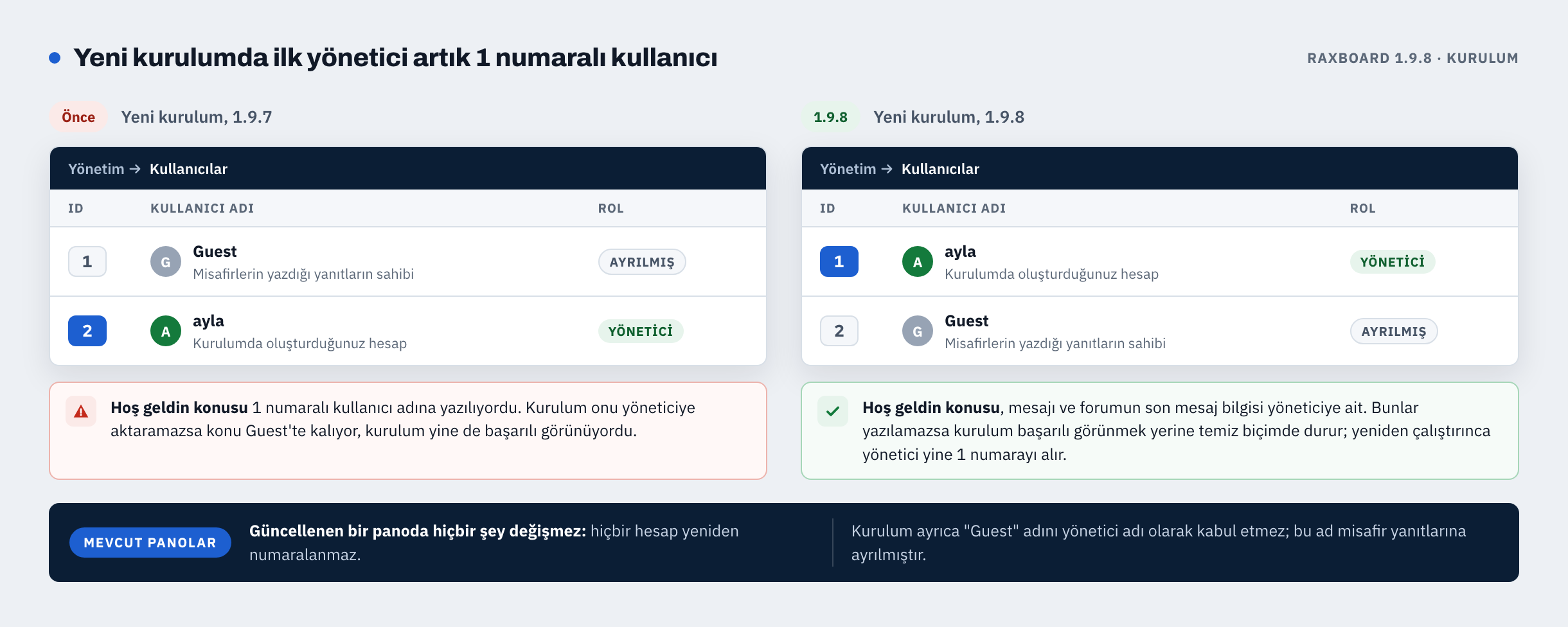
Yalnız yeni kurulumlar değişiyor. Güncellenen bir panoda hiçbir hesap yeniden numaralanmıyor.
- Yönetici hesabı 1 numaralı kimliği, misafirlerin yazdığı yanıtların sahibi olan misafir yazar hesabı ise 2 numaralı kimliği alıyor. Hoş geldin konusu yöneticiye ait.
- Kurulum, yönetici adı olarak "Guest"i kabul etmiyor.
- Son adım başarısız olursa kurulum başarılı görünmek yerine temiz biçimde duruyor; yeniden çalıştırınca yönetici yine 1 numarayı alıyor.
6. Uyarılar: verilen uyarıları düzenleyin, hazır uyarılar tutun
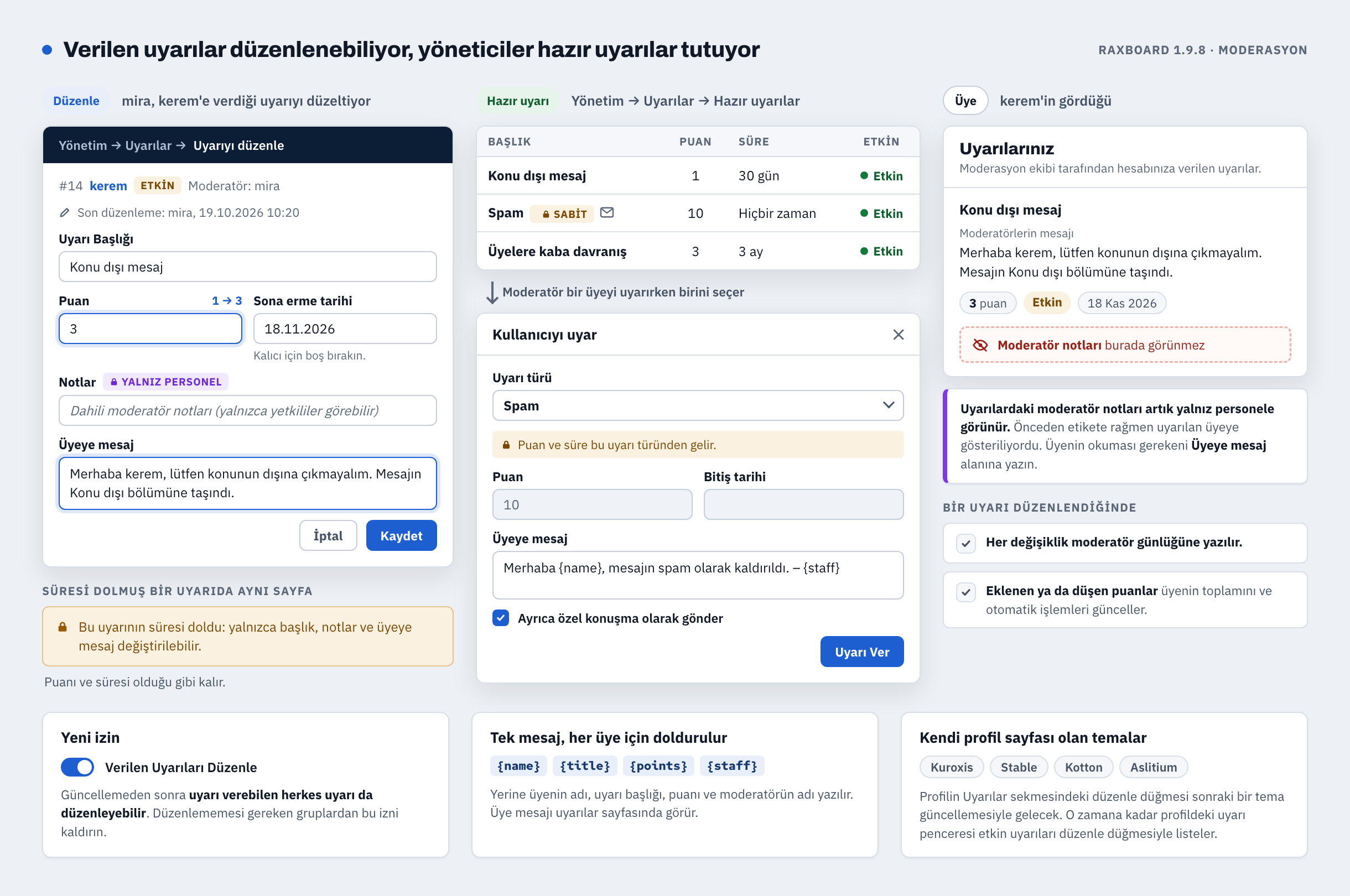
- Yeni Verilen Uyarıları Düzenle izni olan yetkililer, bir uyarının puanını, süresini, başlığını ve üyeye mesajını değiştirebiliyor. Her değişiklik moderatör günlüğüne yazılıyor ve üyenin toplam puanını güncelliyor.
- Hazır uyarılar Yönetim → Uyarılar → Hazır uyarılar altında; moderatörler uyarı verirken birini seçiyor.
- Gizlilik: uyarılardaki moderatör notları artık yalnız yetkililere görünüyor. Üyenin okuması gerekeni Üyeye mesaj alanına yazın.
- Güncellemeden sonra uyarı verebilen herkes uyarıları düzenleyebilir de. Düzenlememesi gereken gruplardan yeni izni kaldırın.
7. Editörde özel karakterler
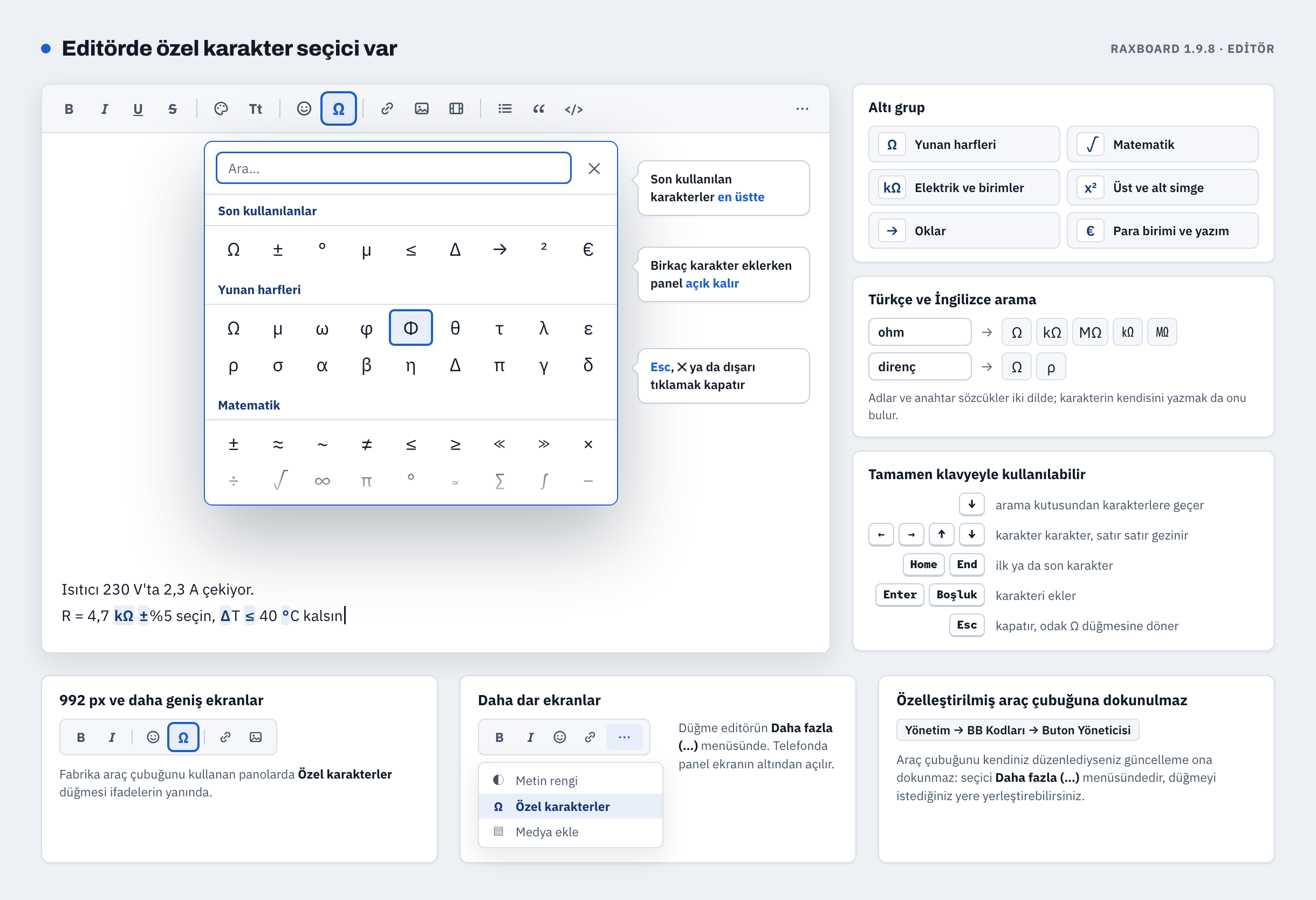
Editörde ifadelerin yanında Özel karakterler düğmesi (Ω) var: altı grup, Türkçe ve İngilizce arama, en üstte son kullanılanlar, tamamen klavyeyle kullanım. Fabrika araç çubuğunda düğme 992 px ve daha geniş ekranlarda görünüyor; diğer durumlarda editörün Daha fazla (…) menüsünde duruyor ve Yönetim → BB Kodları → Buton Yöneticisi'nden yerleştirilebiliyor.
8. Forum logoları her temada tek kurala uyuyor
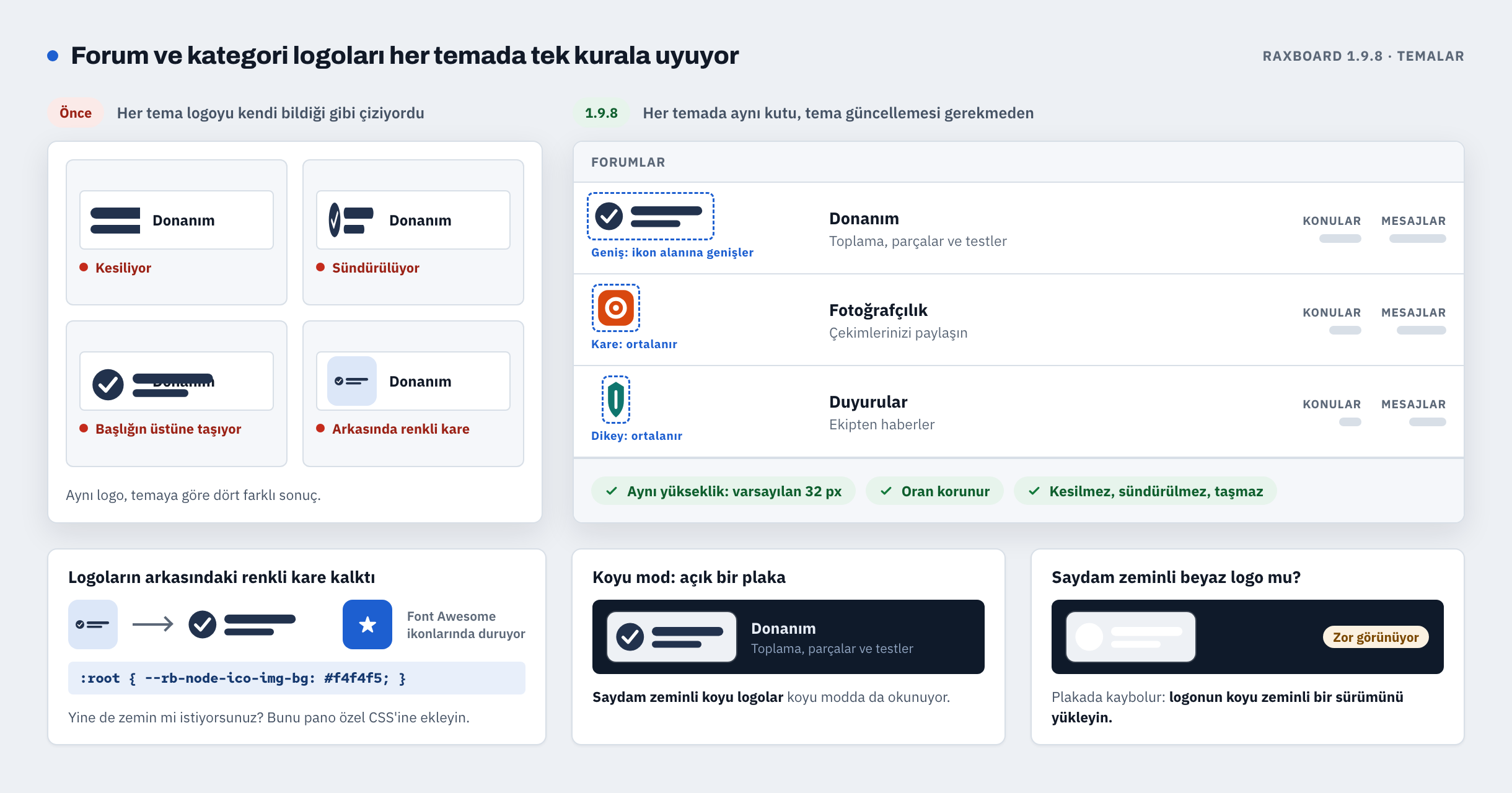
Forum ve kategori logoları artık tüm temalarda, tema güncellemesi gerekmeden aynı biçimde çiziliyor: aynı yükseklikte bir kutu (varsayılan 32 px), oran korunuyor; hiçbir temada logo kesilmiyor, sündürülmüyor ya da taşmıyor.
- Logoların arkasındaki renkli kare kalktı (Font Awesome ikonlarında duruyor). Zemin isterseniz pano özel CSS'ine
:root { --rb-node-ico-img-bg: #f4f4f5; }ekleyin. - Koyu modda logolar açık bir plakada gösteriliyor. Saydam zeminli beyaz bir logo için koyu zeminli bir sürüm yükleyin.
9. Telefonda konu ön eki tasarımları
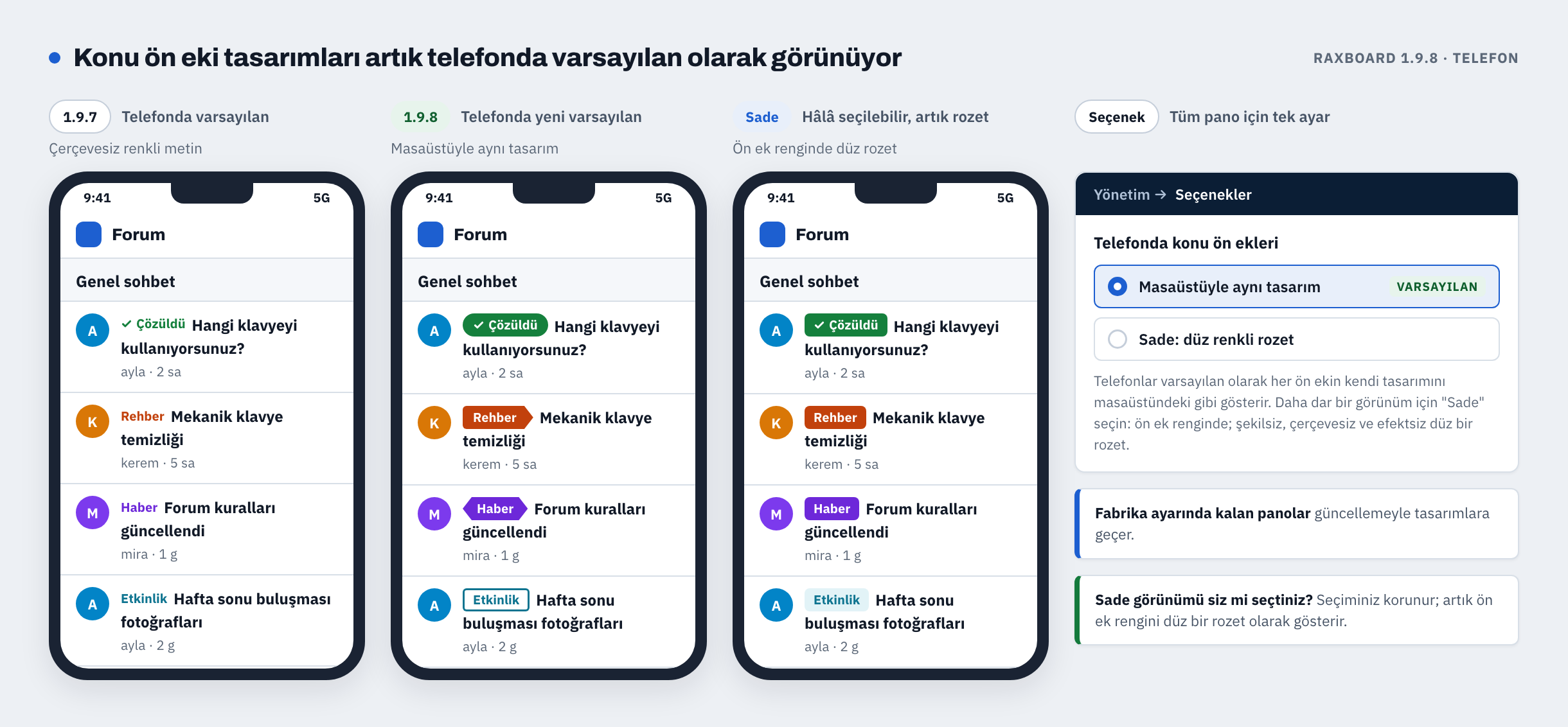
Konu ön eki tasarımları artık telefonda da, masaüstündeki gibi, varsayılan olarak görünüyor. Sade görünüm Seçenekler → İçerik → Telefonda konu ön ekleri altında hâlâ seçilebiliyor ve artık ön ek rengini düz bir rozet olarak koruyor. Yöneticisi bu görünümü seçmiş panolarda ayar korunuyor.
10. "Üst (yatay)" postbit her temada hizalanıyor
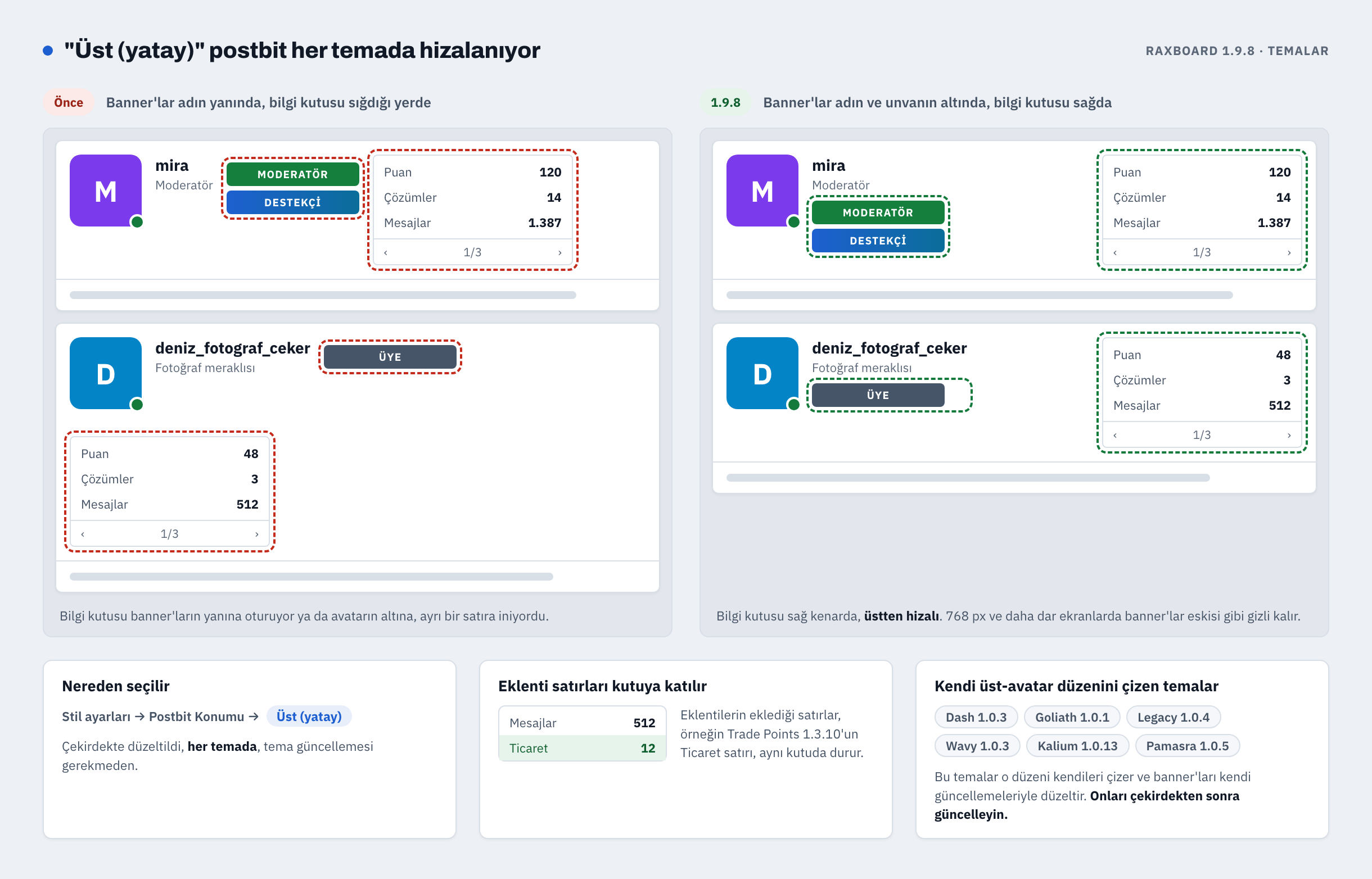
Üyeler bu düzeni Stil ayarları → Postbit Konumu → Üst (yatay) altından seçiyor. 1.9.8 onu çekirdekte, tüm temalarda düzeltiyor: grup banner'ları adın ve unvanın altında, bilgi kutusu sağda ve üstten hizalı. Eklentilerin eklediği satırlar, örneğin Trade Points'in Ticaret satırı (1.3.10'dan beri), kutuya katılıyor.
Dash, Goliath, Legacy, Wavy, Kalium ve Pamasra ayrıca kendi üst-avatar düzenlerini çiziyor (Tema Özelleştirici → Yerleşim → İleti Yazar Düzeni → Üst Avatar). Bu hafta çıkan güncellemeleri (Dash 1.0.3, Goliath 1.0.1, Legacy 1.0.4, Wavy 1.0.3, Kalium 1.0.13, Pamasra 1.0.5) oradaki banner'ları düzeltiyor; bu temaların sonraki her sürümü de bu düzeltmeyi içeriyor.
11. Kupalar ve terfiler: yeni ölçütler, ilerleme kartı, Haftanın ve Ayın Üyesi
- Kupalar ve kullanıcı grubu terfileri artık açılan konu, kabul edilen cevap, itibar ve aktiviteyi de (forumda geçirilen süre, aktif gün sayısı, en uzun günlük ziyaret serisi) kullanabiliyor. Bir kupa tek bir forumdaki konu, mesaj ya da kabul edilen cevap sayısını da şart koşabiliyor.
- Yönetim → Kupalar → Ölçütler her ölçütü, onu kullanan kural sayısıyla listeliyor. Ölçütü kullanılamayan bir kural bekletiliyor: ölçüt geri gelene kadar kimseyi terfi ettirmiyor, indirmiyor, kimseye kupa vermiyor.
- Üyeler kendi profillerinin üstünde bir ilerleme kartı görüyor: en yakın oldukları kupa, sıradaki otomatik unvanları ve İlerlemeyi üyelere göster işaretli terfilerde sıradaki rütbeye ne kadar yaklaştıkları. Kartı başka kimse görmüyor.
- Haftanın Üyesi ve Ayın Üyesi: pano en etkin üyelerini otomatik seçip bir sonraki dönem için onlara banner verebiliyor. İkisi de güncellemeden sonra kapalı; Seçenekler → Kupalar altından açın.
- Kullanıcı unvan basamağı artık itibar, açılan konu ya da kabul edilen cevap sayısına göre de tırmanabiliyor.
12. Yönetim paneline yeni görünüm
Daha belirgin başlıklar, aramalı bir üst çubuk (Ctrl/⌘+K), çerçeveli eylem düğmeleri ve modern form kontrolleri; açık ve koyu modda okunur. Sayfalar ve menü öğeleri yerinde kalıyor; standart yönetim stillerini kullanan eklenti sayfaları yeni görünümü kendiliğinden alıyor.
Güncelleme sırası
- Veritabanının ve dosyaların yedeğini alın; çekirdek klasörlerindeki kendi dosyalarınızı dışarı kopyalayın (yukarıya bakın).
- Çekirdeği 1.9.8'e uygulama içi güncelleyiciyle güncelleyin.
- Sonra temalarınızı güncelleyin: bugün çıkan sürümler aşağıdaki listede; bu hafta çıkan Wavy ve Kalium'u henüz kurmadıysanız onları da kurun. Bugünkü tema düzeltmelerinin birçoğu çekirdek 1.9.8 gerektiriyor. Panonuz Dash kullanıyorsa onu çekirdekle birlikte 1.0.4'e güncelleyin. Bir temayı güncellemek temanın kendi şablonlarını yeniden kurar; şablonlarını düzenlediyseniz önce yedekleyin.
- Ardından dil paketlerinizi pazar yerinden yeniden kurun (bugünkü ikinci güncelleme); böylece yeni metinler çevrilmiş olur.
Bugün çıkan Trade Points 1.3.11, Stories 1.1.4, Media Gallery 1.1.2, Latest Threads 1.3.28, Special Days Pro 1.2.6 ve Migrate 1.3.1 ile bu hafta çıkan Resource Hub 1.2.4 eklentilerini çekirdekten önce ya da sonra güncelleyebilirsiniz; düzeltmelerinin bir kısmı yalnız çekirdek 1.9.8'de görünüyor. Migrate ile XenForo'nun hazır uyarılarını aktaracaksanız önce çekirdeği 1.9.8'e güncelleyin. İki yeni ücretsiz eklenti, Credits 1.0.0 ve Classifieds 1.0.0, ayrı bir yayınla gelecek. İkisi de çekirdek 1.9.7 ya da üstünü istiyor. Büyük panolar, veritabanı sunucuları, imzalarda kullanılmaması gereken özel BB kodları ve CDN arkasındaki panolar için: aşağıdaki ilk yanıtta Güncellemeden önce, ikinci yanıtta Güncellemeden sonra bölümüne bakın.
1.9.8 ile bugün yayınlananlar
Aşağıdaki RaxBoard yanıtları bu listedeki ve bir sonrakindeki her ürünü anlatıyor. Her birinin, tam değişiklik listesiyle Marketplace Updates forumunda kendi konusu da var:
- 6 eklenti, güncellendi: Trade Points 1.3.11 · Stories 1.1.4 · Media Gallery 1.1.2 · Latest Threads 1.3.28 · Special Days Pro 1.2.6 · Migrate 1.3.1
- 9 tema, güncellendi: Kuroxis 1.0.37 · Aslitium 1.0.12 · Stable 1.1.17 · Kotton 1.0.28 · Dash 1.0.4 · Goliath 1.0.2 · Vision 1.0.21 · Legacy 1.0.5 · Pamasra 1.0.6
- 7 dil paketi, ikinci kez güncellendi: en son eklenen yeni metinler. Sürümleri aşağıdaki dil paketleri yanıtında.
Bu hafta yayınlandı — 1.9.8 ile birlikte güncelleyin
- 1 eklenti: Resource Hub 1.2.4
- 2 tema: Wavy 1.0.3 · Kalium 1.0.13
- 7 dil paketi, ilk güncelleme: Türkçe 1.0.31 · Azərbaycan 1.0.18 · Español 1.0.20 · Français 1.0.11 · Русский 1.0.11 · Deutsch 1.0.11 · العربية 1.0.11
Aşağıdaki yanıtlarda
- Ayrıntılı çekirdek 1.9.8 (1/2): kimler güncellemeli, bütün güvenlik düzeltmeleri, yenilikler ve güncellemeden önce bakılacaklar.
- Ayrıntılı çekirdek 1.9.8 (2/2): eklenti ve tema geliştiricileri için notlar, düzeltmeler ve güncellemeden sonra bakılacaklar.
- Eklentiler: bugün güncellenen altı eklenti ve bu hafta güncellenen Resource Hub.
- Temalar: bugünkü güncellemeler ile bu hafta güncellenen Wavy ve Kalium.
- Dil paketleri: bu haftaki güncelleme ve bugünkü ikincisi.
Sorunuz varsa ya da bir şey bu yazılarda anlatıldığı gibi çalışmıyorsa buraya yazın.