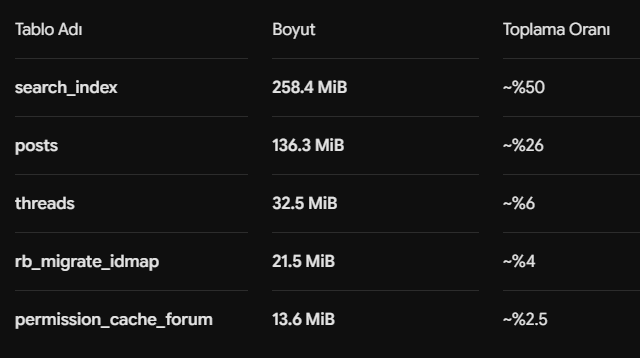
Bu konu herkesi ilgilendirdiği için etiketliyorum
@everyone
Migrate ve optimizasyon sırasında oluşan bazı tablolar (rb_migrate_idmap gibi), XenForo → RaxBoard aktarımı yaptığımız için yedekte/artık olarak kalan geçici tablolardır; bunları temizledik ve normal (sıfırdan) bir kurulumda bu tablolar hiç oluşmaz.
Ama asıl boyut farkının sebebi bu değil: RaxBoard veritabanının yaklaşık %50'si dahili tam-metin arama indeksidir (search_index). Bu tablo, her konu ve mesajın aranabilir bir kopyasını + FULLTEXT indeksini tutar.
Peki neden XenForo'da bu kadar yer kaplamıyordu?
Çünkü XenForo aramayı çoğunlukla
harici bir Elasticsearch sunucusuna devrediyordu — yani arama verisi veritabanının
dışında, ayrı bir serviste duruyordu, bu yüzden XF veritabanı daha küçük görünüyordu. RaxBoard'da ise arama
dahili çalışır; harici sunucuya, ek kuruluma ve ek maliyete gerek kalmadan her şey doğrudan veritabanının içindedir. Kısacası bu "fazladan/çift veri" değil, aramanın nerede durduğuyla ilgili bir tercihtir — ve bizim lehimize: bir Elasticsearch sunucusu kurup bakmanıza gerek yok.
Ayrıca RaxBoard'da Elastic Search için eklenti ücreti ödemenize de gerek yok tamamen dahili ve ücretsiz.
Geçici migrate tablolarını temizledikten sonra son durum:
| RAXBOARD Database | XENFORO Database |
|---|
| 497 MB | 262 MB |
Aradaki farkın neredeyse tamamı bu dahili arama indeksidir; içerik (konu + mesaj) boyutu iki tarafta da benzerdir. Bu tamamen sağlıklı bir durumdur, herhangi bir soruna yol açmaz. Dileyen, ileride harici bir arama motoruna geçerek bu indeksi veritabanı dışına taşıyabilir; ama dahili arama sayesinde buna
mecbur değilsiniz. Sitenizin admin panelinde
"siteadi.com/admin/options#search" yolundan düzenlemelerinizi yapabilirsiniz.
Since this affects everyone, I’m tagging @everyone.
Some tables created during the migration and optimization process (such as rb_migrate_idmap) were temporary tables left over from the XenForo → RaxBoard migration. We’ve removed them, and on a clean RaxBoard installation these tables are never created.
However, this is not the main reason for the database size difference. Approximately 50% of the RaxBoard database consists of the built-in full-text search index (search_index). This table stores a searchable copy of every thread and post, along with its FULLTEXT index.
So why didn’t XenForo’s database take up as much space?
Because XenForo typically delegated search to an
external Elasticsearch server. In other words, the search data was stored
outside the database in a separate service, making the XenForo database appear much smaller. RaxBoard, on the other hand, uses a
built-in search engine. Everything is stored directly in the database, eliminating the need for an external server, additional setup, or extra costs. In short, this is not “duplicate” or “extra” data—it’s simply a different approach to where the search index is stored, and one that works in our favor: you don’t have to deploy or maintain an Elasticsearch server.
Additionally, unlike XenForo, you don’t need to purchase a separate Elasticsearch add-on for RaxBoard—it is built-in and completely free.
After removing the temporary migration tables, the current database sizes are:
| RaxBoard Database | XenForo Database |
|---|
| 497 MB | 262 MB |
Almost all of the remaining size difference comes from the built-in search index. The actual content (threads and posts) occupies nearly the same amount of space in both databases. This is completely normal and does not cause any issues.
If you ever decide to use an external search engine in the future, you can move the search index out of the database. However, thanks to RaxBoard’s built-in search system, you are
not required to do so.
You can configure your search settings from the Admin Control Panel by visiting [i]“
yourdomain.com/admin/options#search”[/i].