


Thread Starter
#0
Latest Available Now: https://raxboard.com/marketplace/latest-threads
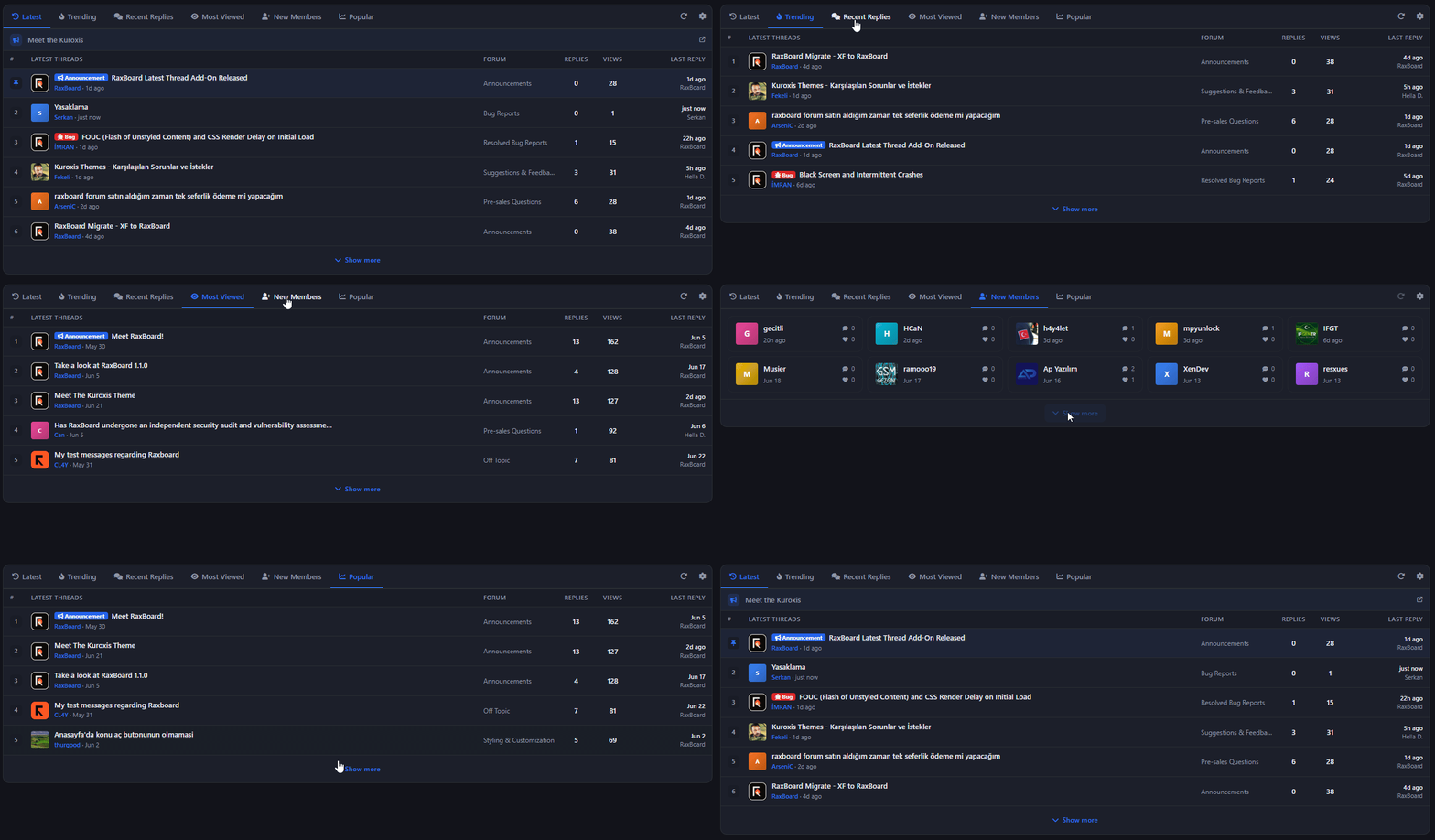
The smart, fully-featured "Latest Threads" add-on for RaxBoard is now on the Marketplace!
Drop one powerful widget onto your homepage and let your members discover the newest discussions, trending topics, threads awaiting a reply, and much more — all with a single tap, browsing between tabs. With server-friendly lazy loading, theme-aware design, and full multi-language support.
Why Latest Threads?
A modern widget that surfaces your forum's liveliest content, blends seamlessly into your theme, and runs smoothly on every device. Full control for admins, personalization for members, and speed for guests.Key Features
- Thread Pinning (Sticky): Authorized members can pin threads to the top of the Latest tab with a hover thumbtack toggle. Pinned threads get a pin badge and are deduplicated out of the normal list. The permission is off by default — admins always allowed, guests never.
- Custom Sticky Links: Admins can define their own title + URL links (with an optional icon) pinned above the thread list on the Latest tab, rendered as full-width rows with an external-link indicator.
- Per-User Tab Customization & Reorder: Logged-in members choose which tabs are visible from a gear menu and reorder them with up/down buttons. Preferences are saved per user and applied intersected with the admin-enabled tab set.
- Refresh (Manual & Auto): A refresh button in the tab bar reloads the active tab (with a spinning icon). Admins can also set the tab to auto-refresh every N seconds in the background (0 disables it, and refresh is skipped while the tab is hidden).
- Lazy Load & Show More: Only the active tab is rendered on page load; other tabs fetch their content on first click. A Show more button at the bottom of each tab progressively expands the list (server-capped at 50 rows).
- Per-Node Permission Filtering: The widget never leaks thread titles from forums the viewer may not see; every thread is filtered against the viewer's permissions to hide gated/private forums (guests are evaluated as the Guest group). Admins can also exclude specific forums entirely.
- Mobile Stacked Layout: On narrow screens the widget switches to a ModernStats-style stacked layout: avatar, prefix and a two-line title with a user·date subline; the number, forum, and last-reply columns are dropped. Reply/view counts can optionally be hidden (hidden by default).
- Multi-Language Support: All tab labels, column headers, buttons, and status messages are wired to the translation system and render in the active language (Turkish and English ship built-in); dates are also shown in a localized format.
- Multi-Theme Style Theming: The widget's colors, borders, corner radius, font size, and row padding are read from the active theme's style properties with separate light/dark-mode values, so it blends into whatever forum theme is in use.
- Rich Display Options: Individually toggle avatars, reply count, view count, forum badge, date, last poster, and thread prefix badges; plus compact mode, hover animations, thread count, max title length, and the date format.
- Custom Tab Titles & Icons: Override each tab's default localized label and icon with your own custom title and FontAwesome icon.
- Empty & Error States: When a tab has no threads to show, an inbox-icon No threads found message appears; if a tab fails to load, a clear could-not-load message asks the viewer to try again.
The Tabs
| Tab | What it does |
|---|---|
| Latest | Lists the most recently created threads newest-first by creation date; pinned threads and custom sticky links appear at the top. |
| Trending | Highlights the most-viewed threads created within the configured trending window (7 days by default). |
| Recent Replies | Orders threads by their most recent reply, showing only threads that already have at least one reply. |
| Most Viewed | Lists the all-time most-viewed threads by view count. |
| Unanswered | Shows threads with zero replies, newest-first, so unanswered discussions get attention. |
| Most Liked | Lists threads with the highest vote/like score, showing only threads with a positive score. |
| New Members | Displays the most recently registered valid members as cards, with their message and reaction counts. |
| Popular | Ranks the most engaging threads by a weighted popularity score combining views, replies, and votes. |
| Latest Posts | Lists every visible post — both thread starters and replies — newest-first, deep-linking straight to the specific post. |
| Recently Viewed | Shows the member's own recently read threads by read date; visible to logged-in members only and hidden for guests. |
Note: Because the Recently Viewed tab relies on personal read history, it is meaningless for guests and is automatically hidden from them.
For Admins
Configure every detail from the admin panel:General Settings
- Number of Threads — max threads shown per tab (1–50)
- Max Title Length — truncate titles beyond this limit (20–200)
- Date Format — Relative / Absolute / Short
Widget Position & Visibility
- Widget Position — Above Content / Below Content / Sidebar / Above Footer
- Display On — Homepage Only / Forum List Pages / All Pages
Tab Configuration
- Enabled Tabs — toggle 10 system tabs
- Default Active Tab — which tab is active when the widget loads
- Trending Period — days considered for trending calculation (1–90)
- Tab Titles & Icons — per-tab custom title + fa-icon override
Display, Sticky Threads & Forums
- Display Options — avatars, reply/view count, forum badge, date, last poster, prefix, compact mode, animations, hide counts on mobile, a manual refresh button, and auto refresh (0–3600 sec)
- Sticky Threads — enable sticky threads, then search for threads to pin and reorder them (move up/down)
- Custom Sticky Items — admin links pinned above the list on the Latest tab: title + URL + fa-icon + Active; up to 20, orderable
- Excluded Forums — search for forums whose threads won't appear in the widget
Theme Customizer (17 Style Properties)
17 style properties, each with separate light/dark-mode values, to fit the widget perfectly into your theme:- ltWidgetBg — Widget Background
- ltWidgetBorder — Widget Border
- ltWidgetPrimary — Widget Accent Color (tabs, hover, highlights)
- ltTabActiveColor — Active Tab Color
- ltTabInactiveColor — Inactive Tab Color
- ltTabBg — Tab Bar Background
- ltHeaderBg — Table Header Background
- ltRowHoverBg — Row Hover Background
- ltTitleColor — Thread Title Color
- ltTitleHoverColor — Thread Title Hover
- ltMetaColor — Meta Text Color (username, date, forum)
- ltStatColor — Stat Number Color
- ltNumBg — Row Number Badge BG
- ltBorderLine — Row Divider Color
- ltWidgetBorderRadius — Widget Border Radius (e.g. 12px)
- ltFontSize — Title Font Size (e.g. 0.8125rem)
- ltRowPadding — Row Padding (e.g. 8px 12px)
Permissions (Per Group)
- view_latest_threads — can view the Latest Threads widget (forum group, default: allow)
- lt_manage_sticky — can pin / unpin threads from the widget (forum group, default: deny)
Installation
- In the admin panel, head to the Marketplace section.
- Find the Latest Threads / Son Konular add-on and click Install.
- After installation, open the settings and configure your tabs, limits, sticky threads, and theme colors to taste.
- Save — the widget is live! Ready in minutes.
Put your forum's best content right in front of your members.
Questions and feedback are welcome — just reply below this topic. Happy posting! :)
Questions and feedback are welcome — just reply below this topic. Happy posting! :)
RaxBoard için akıllı, tam donanımlı "Son Konular / Latest Threads" eklentisi artık Pazaryeri'nde!
Ana sayfanıza tek bir güçlü widget ekleyin; üyeleriniz en yeni tartışmaları, gündemdeki konuları, yanıt bekleyen başlıkları ve daha fazlasını tek dokunuşla, sekmeler arasında gezinerek keşfetsin. Sunucu dostu tembel yükleme, tema uyumlu tasarım ve tam çok dilli destek ile.
Neden Son Konular?
Forumunuzun en canlı içeriğini öne çıkaran, temanıza kusursuzca uyum sağlayan ve her cihazda pürüzsüz çalışan modern bir widget. Yöneticiye tam kontrol, üyeye kişiselleştirme, misafire hız sunar.Öne Çıkan Özellikler
- Konu Sabitleme (Pin): Yetkili üyeler, konunun üzerine gelip iğne simgesine tıklayarak konuları En Yeni sekmesinin en üstüne sabitleyebilir. Sabitlenen konular iğne rozetiyle işaretlenir ve normal listeden ayıklanır. Yetki varsayılan olarak kapalıdır — yöneticiler her zaman yetkilidir, misafirler asla.
- Özel Sabit Bağlantılar: Yöneticiler kendi başlık + URL bağlantılarını (isteğe bağlı simgeyle) En Yeni sekmesinde listenin üstüne sabitleyebilir; bu bağlantılar dış bağlantı simgesiyle tam genişlikte satırlar olarak gösterilir.
- Kişisel Sekme Özelleştirme ve Sıralama: Giriş yapmış üyeler dişli menüsünden hangi sekmelerin görüneceğini seçer ve yukarı/aşağı düğmeleriyle sıralamayı değiştirir. Tercihler her üye için kaydedilir ve yöneticinin etkinleştirdiği sekmelerle kesiştirilerek uygulanır.
- Yenileme (Elle ve Otomatik): Sekme çubuğundaki yenileme düğmesi etkin sekmeyi (dönen simge ile) yeniden yükler. Yönetici ayrıca sekmeyi her N saniyede bir arka planda otomatik yenilenecek biçimde ayarlayabilir (0 devre dışı bırakır; sekme gizliyken yenileme atlanır).
- Tembel Yükleme ve Daha Fazla Göster: Sayfa açılırken yalnızca etkin sekme hazırlanır; diğer sekmeler ilk tıklamada arka planda getirilir. Her sekmenin altındaki Daha fazla göster düğmesi listeyi kademeli olarak genişletir (sunucu 50 satırla sınırlar).
- Foruma Göre İzin Filtreleme: Widget, görüntüleyenin göremeyeceği forumlardaki başlıkları asla sızdırmaz; her konu görüntüleyenin izinlerine göre süzülür (misafirler Misafir grubu olarak değerlendirilir). Yöneticiler belirli forumları tamamen hariç tutabilir.
- Mobil Yığın Düzeni: Dar ekranlarda widget, avatar + ön ek + iki satırlık başlık ve kullanıcı·tarih alt satırı gösteren ModernStats tarzı yığın düzenine geçer; numara, forum ve son yanıt sütunları kaldırılır. Yanıt/görüntülenme sayıları isteğe bağlı gizlenebilir (varsayılan gizli).
- Çoklu Dil Desteği: Tüm sekme etiketleri, sütun başlıkları, düğmeler ve durum mesajları çeviri sistemine bağlıdır ve aktif dilde gösterilir (Türkçe ve İngilizce hazır gelir); tarihler de yerelleştirilmiş biçimde görüntülenir.
- Tema ve Stil Renklendirme: Renkler, kenarlıklar, köşe yuvarlaklığı, yazı boyutu ve satır boşluğu aktif temanın stil özelliklerinden okunur ve açık/koyu mod için ayrı değerler destekler; böylece her forum temasına uyum sağlar.
- Zengin Görünüm Seçenekleri: Avatar, yanıt sayısı, görüntülenme, forum rozeti, tarih, son yazan ve ön ek rozetleri ayrı ayrı açılıp kapatılabilir; ayrıca sıkışık mod, üzerine gelme animasyonları, konu sayısı, maksimum başlık uzunluğu ve tarih biçimi ayarlanabilir.
- Özel Sekme Başlıkları ve Simgeleri: Her sekmenin varsayılan etiketi ve simgesi, yöneticinin belirlediği kendi başlığı ve FontAwesome simgesiyle değiştirilebilir.
- Boş ve Hata Durumları: Bir sekmede gösterilecek konu yoksa gelen kutusu simgesiyle Konu bulunamadı mesajı; bir sekme yüklenemezse tekrar deneme isteyen anlaşılır bir hata mesajı gösterilir.
Sekmeler
| Sekme | Ne Yapar? |
|---|---|
| En Yeni | En son açılan konuları oluşturulma tarihine göre (en yeniden eskiye) listeler; sabitlenmiş konular ve özel sabit bağlantılar en üstte gösterilir. |
| Gündemde | Belirlenen gün sayısı içinde (varsayılan 7 gün) açılan ve en çok görüntülenen konuları öne çıkarır. |
| Son Yanıtlar | En son yanıt alan konuları son mesaj tarihine göre sıralar; yalnızca yanıtı olan konuları gösterir. |
| En Çok Görüntülenen | Tüm zamanların en çok görüntülenme sayısına sahip konularını listeler. |
| Yanıtlanmamış | Henüz hiç yanıt almamış (sıfır yanıtlı) konuları en yeniden eskiye gösterir. |
| En Beğenilen | En yüksek oy/beğeni puanına sahip konuları listeler; yalnızca olumlu puanı olanları gösterir. |
| Yeni Üyeler | En son kaydolan geçerli üyeleri kart düzeninde, mesaj ve tepki sayılarıyla gösterir. |
| Popüler | Görüntülenme, yanıt ve oyları birlikte ağırlıklandıran bir popülerlik puanına göre en dikkat çeken konuları sıralar. |
| Son Mesajlar | Konu başlangıçları ve yanıtlar dahil her görünür mesajı en yeniden eskiye listeler ve doğrudan ilgili mesaja bağlantı verir. |
| Son Görüntülenenler | Üyenin en son okuduğu konuları okunma tarihine göre gösterir; yalnızca giriş yapmış üyeler için görünür, misafirlerde otomatik gizlenir. |
Not: Son Görüntülenenler sekmesi kişisel okuma geçmişine dayandığından misafirler için anlamsızdır ve onlara otomatik olarak gizlenir.
Yöneticiler İçin
Yönetim panelinden her ayrıntıyı yapılandırın:Genel Ayarlar
- Konu Sayısı — her sekmede gösterilecek maksimum konu (1–50)
- Maks. Başlık Uzunluğu — bu sınırı aşan başlıkları kısaltır (20–200)
- Tarih Biçimi — Göreli / Mutlak / Kısa
Widget Konumu ve Görünürlük
- Widget Konumu — İçeriğin Üstünde / Altında / Kenar Çubuğu / Alt Bilginin Üstünde
- Şurada Göster — Yalnızca Ana Sayfa / Forum Liste Sayfaları / Tüm Sayfalar
Sekme Yapılandırması
- Etkin Sekmeler — 10 sistem sekmesini aç/kapat
- Varsayılan Etkin Sekme — widget yüklendiğinde açık gelen sekme
- Gündem Süresi — gündem hesabı için dikkate alınan gün sayısı (1–90)
- Sekme Başlıkları ve Simgeleri — her sekme için özel başlık + fa-simge
Görünüm, Sabit Konular ve Forumlar
- Görünüm Seçenekleri — avatar, yanıt/görüntülenme sayısı, forum rozeti, tarih, son yazan, ön ek, sıkışık mod, animasyonlar, mobilde sayıları gizle, elle yenileme düğmesi ve otomatik yenileme (0–3600 sn)
- Sabit Konular — sabit konuları etkinleştirin ve sabitlenecek konuları arayıp yukarı/aşağı taşıyarak sıralayın
- Özel Sabit Öğeler — En Yeni sekmesinde listenin üstüne sabitlenen yönetici bağlantıları: başlık + URL + fa-ikon + Aktif; en fazla 20, sıralanabilir
- Hariç Tutulan Forumlar — konuları widget'ta görünmeyecek forumları arayıp seçin
Tema Özelleştirici (17 Stil Özelliği)
Widget'ı temanıza dört dörtlük oturtmak için 17 stil özelliği, açık/koyu mod için ayrı değerlerle:- ltWidgetBg — Widget Arka Planı
- ltWidgetBorder — Widget Kenarlığı
- ltWidgetPrimary — Widget Vurgu Rengi (sekmeler, hover, vurgular)
- ltTabActiveColor — Etkin Sekme Rengi
- ltTabInactiveColor — Etkin Olmayan Sekme Rengi
- ltTabBg — Sekme Çubuğu Arka Planı
- ltHeaderBg — Tablo Başlığı Arka Planı
- ltRowHoverBg — Satır Hover Arka Planı
- ltTitleColor — Konu Başlığı Rengi
- ltTitleHoverColor — Konu Başlığı Hover Rengi
- ltMetaColor — Meta Metin Rengi (kullanıcı adı, tarih, forum)
- ltStatColor — İstatistik Sayı Rengi
- ltNumBg — Satır Numara Rozeti Arka Planı
- ltBorderLine — Satır Ayırıcı Rengi
- ltWidgetBorderRadius — Widget Köşe Yuvarlaklığı (örn. 12px)
- ltFontSize — Başlık Yazı Boyutu (örn. 0.8125rem)
- ltRowPadding — Satır İç Boşluğu (örn. 8px 12px)
İzinler (Grup Bazlı)
- view_latest_threads — Son Konular widget'ını görüntüleyebilir (forum grubu, varsayılan: izin ver)
- lt_manage_sticky — widget'tan konu sabitleyebilir / kaldırabilir (forum grubu, varsayılan: reddet)
Kurulum
- Yönetim panelinde Pazaryeri bölümüne gidin.
- Son Konular / Latest Threads eklentisini bulun ve Kur deyin.
- Kurulum sonrası ayarları açın; sekmelerinizi, sınırlarınızı, sabit konularınızı ve tema renklerinizi zevkinize göre yapılandırın.
- Kaydedin — eklenti yayında! Birkaç dakikada hazır.
Forumunuzun en iyi içeriğini üyelerinizin gözünün önüne getirin.
Sorularınız ve geri bildirimleriniz için bu konunun altına yazmaktan çekinmeyin. İyi forumlar! :)
Sorularınız ve geri bildirimleriniz için bu konunun altına yazmaktan çekinmeyin. İyi forumlar! :)